
Article
How to Improve Recruiter Response Time in 2026

How to Improve Recruiter Response Time in 2026
TL;DR:
- Shortening recruiter response time significantly improves application-to-hire ratios, especially with acknowledgment within 60 minutes. Automation, multi-channel communication, and personalized messaging are essential to sustain rapid and effective candidate engagement. Tracking key response metrics helps teams identify bottlenecks and maintain continuous improvement.
Recruiter response time is defined as the elapsed time between a candidate action and a recruiter’s reply, and shortening it is one of the highest-leverage changes a hiring team can make. Acknowledging applications within 60 minutes produces a 10–20% improvement in application-to-hire ratio. Responses that arrive after 24 hours register the same as no response at all. The good news is that automation and personalized communication, not more recruiter hours, are what close that gap. This article covers the tools, workflows, and measurement practices that hiring teams and staffing agencies need to improve recruiter response time in a sustainable way.
What tools do you need to improve recruiter response time?
The right technology stack is the foundation of faster candidate communication. Without it, speed depends entirely on individual recruiter discipline, which does not scale.
Every high-performing setup starts with an applicant tracking system (ATS) that supports real-time webhook triggers. Webhooks fire an event the moment a candidate submits an application, completes an interview, or changes status. That event then kicks off automated follow-up sequences without any manual input. Without real-time triggers, delays are built into the process before a recruiter even opens their inbox.
Multi-channel communication tools sit on top of the ATS. Slack, email, and SMS each reach different stakeholders at different speeds. Slack works best for internal hiring manager nudges. Email handles formal candidate updates. SMS reaches candidates who do not monitor email closely. An orchestration layer, such as a workflow automation platform, ties these channels together so messages fire in the right order and through the right channel.
Structured, mobile-optimized scorecards matter more than most teams realize. When hiring managers receive a feedback request on their phone, a form that requires desktop access or heavy scrolling gets ignored. Screening bottlenecks often trace back to feedback forms that are too cumbersome to complete quickly. Scorecards should be short, mobile-friendly, and pre-populated with candidate details pulled from the ATS.
Documented standard operating procedures (SOPs) complete the stack. Technology without process documentation creates inconsistency. Every recruiter on the team should know the exact escalation path, the timing of each touchpoint, and who owns each step.
| Feature category | What to look for |
|---|---|
| ATS integration | Real-time webhooks and API support |
| Candidate messaging | Multi-channel delivery (email, SMS, Slack) |
| Feedback collection | Mobile-optimized, pre-filled scorecards |
| Workflow orchestration | Conditional logic and escalation routing |
| Reporting | Response time dashboards with SLA tracking |
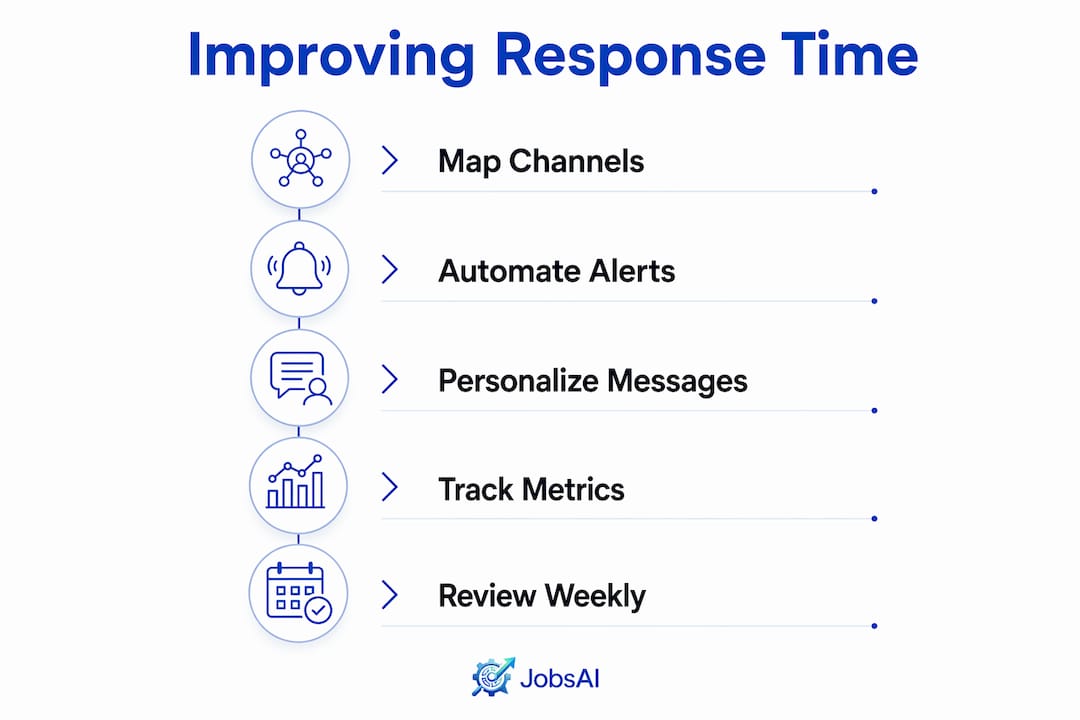
How do you set up automated multi-channel communication sequences?
The sequence design is where most teams either win or lose on speed. A well-built sequence removes manual chasing entirely for the majority of roles.
- Trigger an acknowledgment within 60 minutes of application receipt. This message confirms the application, sets expectations for next steps, and includes the role title and recruiter name. It should feel personal, not like a system notification.
- Send an interview confirmation immediately after scheduling. Include the date, time, format, and interviewer name. Do not wait for a recruiter to manually draft this.
- Fire a feedback request to the hiring manager within 15 minutes of the interview ending. Use a Slack DM as the first channel. Multi-channel sequences using Slack first achieve 87–96% feedback completion within 24 hours, compared to far lower rates with email-only reminders.
- Send an email reminder at the 4-hour mark if the Slack message has not produced a response. Keep it short: one sentence, one link to the scorecard.
- Escalate to the HR business partner at the 8-hour mark if feedback is still missing. Automated escalation removes the awkward dynamic of a recruiter chasing a senior hiring manager.
- Send a candidate status update within 24 hours of the feedback deadline, regardless of whether a decision has been made. Silence is the fastest way to lose a candidate.
Pro Tip: Map each stakeholder’s preferred channel before building the sequence. Hiring managers who live in Slack respond faster to DMs. Candidates who applied via mobile respond faster to SMS. Matching the channel to the person triples engagement rates.
Timing is the variable most teams underestimate. Reaching a prospect within 5 minutes is 21 times more effective than waiting 30 minutes. That ratio applies to internal stakeholders too, not just candidates.

How to personalize communication while using automation
Automation and personalization are not opposites. The teams that treat them as opposites end up with either slow, manual processes or fast, generic messages that candidates ignore.
Personalization starts with the data already in your ATS. Every automated message should pull in the candidate’s first name, the specific role title, the hiring manager’s name, and the date of the last interaction. These four variables alone make a templated message feel written for that person. Generic openers like “Dear Candidate” or “Regarding your application” signal immediately that no one read the file.
- Use the candidate’s first name in the subject line, not just the body.
- Reference the specific role, not just “the position you applied for.”
- Mention the last touchpoint: “Following your interview on Tuesday with Sarah Chen.”
- Adjust tone by stage: warmer for early-stage candidates, more direct for finalists.
- Avoid phrases that expose the template: “As per our records,” “Please be advised,” or “This is an automated message.”
AI drafting tools let recruiters maintain voice-consistent, personalized communication at scale. Rejection emails and status updates drafted with AI assistance recover over an hour of daily manual work per recruiter. The key is training the AI on your team’s actual tone, not using default outputs that sound like legal disclaimers.
Pro Tip: Write three template variations for each message type: one for candidates who applied cold, one for referrals, and one for candidates you sourced directly. The context difference changes the appropriate warmth level significantly.
Personalized automated messages consistently outperform late manual emails in candidate perception scores. Timing and relevance matter more than whether a human typed the message.
How do you measure and track recruiter response time effectively?
Measurement turns a one-time improvement into a repeatable process. Without data, teams revert to old habits within weeks of any workflow change.
The four metrics every recruiting team should track are: initial response time (time from application to first acknowledgment), feedback cycle time (time from interview end to scorecard submission), acknowledgment rate (percentage of applications acknowledged within 60 minutes), and escalation rate (percentage of feedback requests that required escalation). Each metric points to a different failure point in the process.
Manual feedback collection averages 4.7 business days. Automated multi-channel orchestration reduces that to under 8 hours for 80% of roles. That gap represents a concrete benchmark: if your feedback cycle is above 8 hours, automation is the fix.
| Metric | Typical manual baseline | Optimized target |
|---|---|---|
| Initial acknowledgment | 12–48 hours | Under 60 minutes |
| Feedback cycle time | 2.8–4.7 days | Under 8 hours |
| Acknowledgment rate | 40–60% | 90%+ |
| Escalation rate | Not tracked | Under 15% |
Build dashboards that correlate response time with outcomes. Teams that reduce feedback collection time from 4.7 days to under 8 hours see a 5.3-day reduction in time-to-hire and 10% higher candidate acceptance rates. That correlation makes the business case for continued investment in communication infrastructure.
Segment your metrics by role type and client. A high-volume hourly role has different response expectations than a senior executive search. Treating all roles identically in your dashboard hides performance problems in specific segments. Review metrics weekly at the team level and monthly at the process level.
Common measurement pitfalls include tracking only average response time (which masks outliers), measuring only inbound candidate messages (which ignores internal feedback delays), and failing to tie response time data to offer acceptance rates. Fix these gaps and your dashboard becomes a genuine decision tool, not just a reporting exercise.
What are the most common challenges in reducing recruiter response time?
Even well-designed workflows break down. Knowing where they fail makes the difference between a temporary fix and a lasting improvement.
Over-automation is the most common early mistake. When every touchpoint is automated without personalization variables, candidates notice. A message that arrives 30 seconds after an application with no personal details reads as a bot confirmation, not a recruiter acknowledgment. The fix is adding at least three personalization variables to every automated message and reviewing templates quarterly.
Channel mismatch causes poor conversion rates. Matching reminders to the recipient’s preferred channel triples engagement. Sending Slack messages to hiring managers who never use Slack, or emailing candidates who only check SMS, produces the same outcome as sending nothing. Build a channel preference field into your ATS intake process and map it to your orchestration logic.
Out-of-office scenarios break escalation chains. If a hiring manager is on vacation and the escalation path points only to them, feedback stalls. Set up backup escalation contacts for every role before the interview is scheduled, not after the delay occurs.
- Identify which stage has the longest average delay using your dashboard.
- Check whether that stage has an automated trigger or relies on manual action.
- If manual, add an automation. If automated, check whether the channel matches recipient preferences.
- Review the message template for personalization gaps.
- Test the full sequence end-to-end with a real role before rolling out broadly.
“Response time consistency depends more on systematic protocol than on individual recruiter effort. Enforcing SLAs and automating scheduling are the keys to scalability, not hiring faster recruiters.”
Incremental cadence adjustments based on data outperform wholesale process redesigns. Change one variable at a time, measure the impact over two to three weeks, and then adjust again. This approach builds team confidence and produces reliable results.
Key Takeaways
Faster recruiter response time requires automated multi-channel workflows, personalized messaging, and consistent SLA enforcement to produce measurable gains in candidate acceptance and time-to-hire.
| Point | Details |
|---|---|
| 60-minute acknowledgment standard | Acknowledging applications within 60 minutes improves application-to-hire ratio by 10–20%. |
| Multi-channel sequences outperform email alone | Slack-first, email-second, escalation-third sequences achieve 87–96% feedback completion within 24 hours. |
| Personalization variables drive engagement | Pulling candidate name, role, and last interaction from your ATS makes automated messages feel human. |
| Measure four core metrics | Track initial response time, feedback cycle, acknowledgment rate, and escalation rate to find failure points. |
| Channel matching triples conversion | Sending reminders through each recipient’s preferred channel produces three times higher engagement rates. |
What I’ve learned from watching teams actually fix this problem
I’ve seen recruiting teams spend months debating which ATS to buy while their average feedback cycle sits at five days. The technology decision matters far less than the discipline to enforce SLAs once any system is in place. Response time consistency comes from protocol, not from individual recruiter motivation.
The teams that sustain improvements share one habit: they review response time data in their weekly team meeting, not in a monthly report that no one reads. When a recruiter sees their acknowledgment rate drop from 92% to 74% in a single week, they know something broke. That visibility creates accountability without requiring a manager to chase anyone.
The personalization question trips up a lot of teams. They assume automation means generic. The reality is that a well-built automated message with the right variables outperforms a manually written email sent two days late. Candidates do not care whether a human typed the message. They care whether it arrived on time and addressed their actual situation.
The metric I find most revealing is escalation rate. If more than 15% of feedback requests require escalation, the primary sequence is not working. That number tells you whether your channel choices are wrong, your templates are weak, or your hiring managers simply do not see feedback submission as a priority. Each cause has a different fix, and the escalation rate points you to the right one.
Continuous improvement here is not a one-time project. Candidate expectations shift, team composition changes, and role volume fluctuates. Build a quarterly review of your communication workflows into your team calendar and treat it with the same seriousness as a budget review.
— Hippolyte A.
Jobsai Enterprise helps recruiting teams respond faster at every stage
Recruiting teams that want to close the gap between application receipt and first response need more than good intentions. They need a system that handles the triggering, sequencing, and tracking automatically.
Jobsai Enterprise is an AI-powered talent acquisition operating system built for hiring teams and staffing agencies. It integrates with your ATS to fire real-time acknowledgments, manages multi-channel outreach campaigns, and tracks response time metrics in a single dashboard. AI drafting tools help your team maintain personalized, voice-consistent communication without adding manual work. The workflow automation layer handles escalation routing so no feedback request falls through the gaps. See the full feature set and review Jobsai Enterprise pricing to find the plan that fits your team’s volume and workflow.
FAQ
What is a good recruiter response time benchmark?
Acknowledging applications within 60 minutes is the industry benchmark for candidate experience. Responses after 24 hours have the same negative impact as no response at all.
How does automation improve recruiter reply speed?
Automated workflows trigger acknowledgments and reminders the moment a candidate action occurs, removing the delay caused by manual inbox monitoring. Multi-channel sequences achieve 87–96% feedback completion within 24 hours.
What metrics should I track to measure hiring feedback time?
Track initial response time, feedback cycle time, acknowledgment rate, and escalation rate. These four metrics identify exactly which stage in your process is creating delays.
Why do personalized automated messages outperform manual emails?
Candidates value timing and relevance over delivery method. A personalized automated message sent within minutes consistently outperforms a manually written email sent two days later.
How do I speed up candidate communication without adding recruiter workload?
Build automated multi-channel sequences triggered by ATS webhooks, use AI drafting tools for status updates and rejections, and enforce SLAs through escalation routing rather than manual follow-up.
Recommended
See it in your workflow
JobsAI Enterprise runs sourcing, AI screening, and the whole interview pipeline in one place. Book a walkthrough tailored to your team.
Book a demo