
Article
How Recruiters Organize Applicant Data Efficiently

How Recruiters Organize Applicant Data Efficiently
TL;DR:
- Applicant tracking systems organize candidate data into structured, searchable records that streamline hiring processes. Consistent taxonomy, AI-assisted verification, and real-time updates improve data accuracy and enable efficient candidate search and ranking. Effective discipline and standardized practices prevent losing valuable candidates and maximize recruitment success.
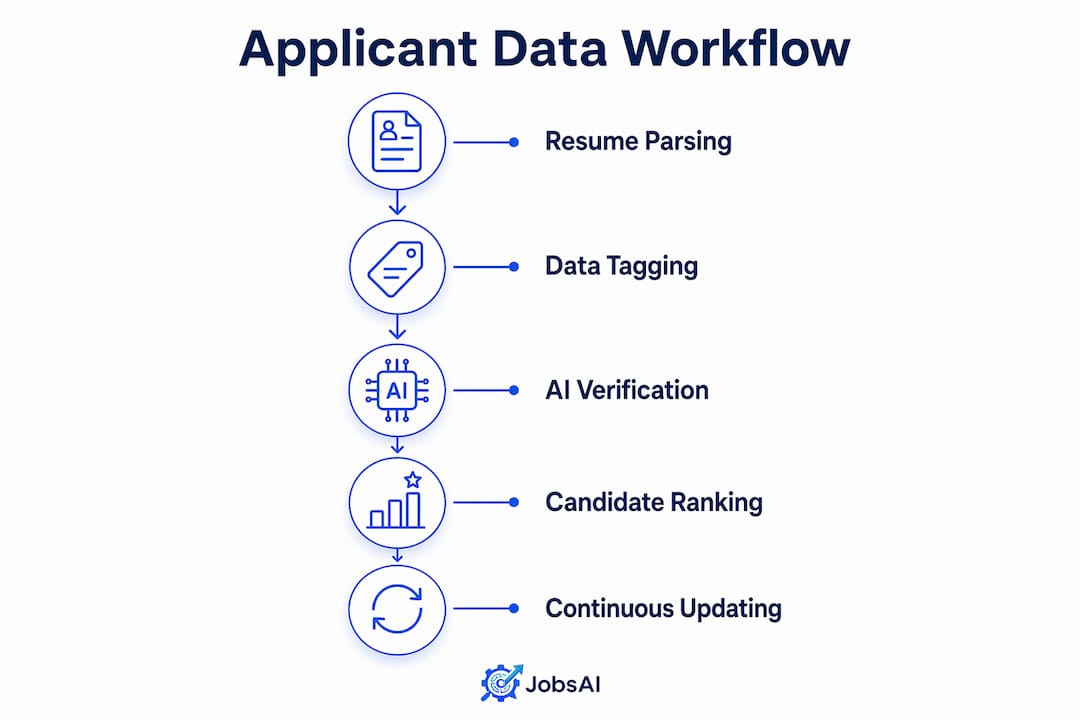
Applicant tracking systems (ATS) are the primary method recruiters use to organize applicant data, converting unstructured resumes into structured, searchable candidate records. An ATS functions as a recruitment-specific CRM, storing every candidate’s contact details, skill tags, application status, and recruiter notes in one centralized database. The difference between a hiring team that fills roles in two weeks and one that takes two months often comes down to how well their candidate data is structured. Consistent taxonomy, dynamic workflows, and AI-assisted verification are the three pillars that separate functional recruitment databases from ones that quietly lose good candidates between hiring cycles.
How do recruiters organize applicant data with ATS platforms?
ATS architectures function as specialized CRMs that use resume parsing to convert unstructured text into standardized data fields. That conversion is what makes candidate records searchable and comparable at scale. Without it, every resume stays a PDF sitting in someone’s inbox.
The core data fields an ATS captures include:
- Candidate ID — a unique identifier that links all activity to one profile
- Contact information — email, phone, and LinkedIn URL
- Skill tags — normalized labels like “Python,” “project management,” or “GAAP accounting”
- Experience timeline — job titles, employers, and date ranges parsed from resume text
- Application status — current stage in the hiring pipeline (applied, screened, interviewed, offered, hired)
- Recruiter notes — free-text observations attached to each candidate record
Each field serves a specific function. Skill tags power keyword searches. Application status feeds pipeline reports. Recruiter notes carry context that no algorithm captures on its own.
| ATS Component | Primary Function |
|---|---|
| Resume parser | Converts PDF/Word resumes into structured data fields |
| Candidate database | Stores and indexes all candidate profiles for search |
| Workflow engine | Tracks stage progression and triggers recruiter tasks |
| Search and ranking layer | Filters and ranks candidates using Boolean queries and algorithms |
ATS platforms commonly pair relational databases like PostgreSQL with search indexes like Elasticsearch to support fast filtering and ranking. That combination means a recruiter can search 50,000 profiles and get ranked results in under a second.
What data standards keep candidate records accurate and usable?
Consistent taxonomy is the foundation of reliable applicant data management. Recruiters who adopt standard fields including source, last contacted date, conversation status, and next steps keep candidate records searchable and actionable across hiring cycles. Without those standards, a strong candidate from six months ago becomes invisible the next time a similar role opens.
A practical taxonomy for organizing candidate information follows this sequence:
- Define your source field — record where each candidate came from (LinkedIn, referral, job board, inbound application). This tells you which channels produce quality hires over time.
- Set a last-contacted date — update this field after every interaction. A profile with no contact date in 90 days is a signal to re-engage or archive.
- Assign a conversation status — use a fixed set of labels: “not contacted,” “in conversation,” “on hold,” “rejected,” “placed.” Free-text status fields create chaos.
- Log next steps — attach a specific action and a due date to every active candidate. “Follow up” is not a next step. “Send job description by Friday” is.
- Apply skill and seniority tags — use a controlled vocabulary. If one recruiter tags “Sr. Engineer” and another tags “Senior Software Engineer,” your search results will miss candidates.
- Set data retention rules — decide how long inactive records stay in the database. Most compliance frameworks require a defined retention period, and stale data degrades search quality.
Pro Tip: Build your taxonomy before you import any data. Retrofitting field standards onto an existing database of thousands of records takes far longer than defining them upfront.
Tagging strategies work best when they are enforced at the point of entry. If your ATS allows free-text skill fields, recruiters will enter inconsistent labels. Controlled dropdown menus or tag libraries eliminate that problem at the source.
What role does AI play in organizing and updating applicant data?
AI changes applicant data management from a manual data-entry task into an automated, continuously updated workflow. The most direct application is automated resume collection and first-touch outreach, where AI agents gather candidate information and populate structured fields without recruiter intervention.

The quality of AI-collected data depends on how the system handles uncertainty. AI-driven data collection uses per-field confidence indicators to prioritize verified data over fabricated information, protecting recruiter credibility. A confidence score next to a candidate’s current employer tells you whether that field came from a verified company filing or an unconfirmed data-broker record. That distinction matters when you are making a hiring decision.
Filtering out data-broker domains ensures candidate databases source records from trusted places like industry media and official company filings. Low-trust sources introduce errors that compound over time. One wrong job title in a candidate’s profile can cause them to be filtered out of searches they should appear in.
AI also supports dynamic workflow management through automated tagging of interaction outcomes. When a recruiter marks a call as “interested but not available until Q3,” an AI-assisted system can tag that candidate for automatic re-engagement in the right timeframe. Key capabilities in this area include:
- Automated resume parsing with field-level confidence scoring
- Interaction logging that records email opens, reply rates, and call outcomes
- Re-engagement triggers based on candidate status and time elapsed
- Duplicate detection that merges records when the same candidate applies through multiple channels
Pro Tip: Always review AI-populated fields for senior or executive roles before outreach. Confidence indicators flag uncertainty, but a human check on high-stakes profiles prevents embarrassing errors.
Structuring candidate data into analytical dimensions enables objective, evidence-based recruitment decisions instead of subjective resume reviews. That shift from gut-feel screening to data-backed comparison is where AI delivers its clearest value.
How do recruiters search, filter, and prioritize candidates using organized data?
Structured data only pays off when recruiters can retrieve the right candidates quickly. Search and ranking layers use Boolean queries and algorithms to prioritize candidates for recruiters, turning a database of thousands into a shortlist of ten in seconds.
Boolean search lets recruiters combine conditions precisely. A query like “Java AND (AWS OR Azure) AND NOT contractor” returns only candidates who match all three criteria. Without structured skill tags, that query returns nothing useful. The quality of your search results is a direct reflection of the quality of your tagging.
Ranking algorithms add a second layer of prioritization. Most enterprise platforms score candidates against a job description using weighted criteria: required skills carry more weight than preferred skills, recent experience outranks older roles, and location proximity factors in when relevant. Recruiters who score resumes against job requirements systematically reduce the time spent reviewing unqualified profiles.
| Search Method | Best Use Case |
|---|---|
| Boolean keyword search | Finding candidates with specific skill combinations |
| Ranking algorithm | Prioritizing best-fit candidates from a large pool |
| Pipeline stage filter | Reviewing all candidates at a specific hiring stage |
| Tag-based filter | Pulling candidates by role family, seniority, or source |
| Date-based filter | Identifying candidates due for follow-up or re-engagement |
Audit trails matter as much as search speed. Every status change, note, and outreach attempt should be logged with a timestamp and the recruiter’s name. That log protects against compliance questions and gives new team members full context when they inherit a role. Candidate engagement tracking built into the workflow removes the need for manual logging and keeps records accurate without extra effort.
Treating the candidate database as a dynamic workflow with real-time tagging of conversation outcomes ensures records stay current. Static one-time uploads become outdated within weeks. A database that updates automatically with every interaction is a living asset, not a filing cabinet.
Key Takeaways
Effective recruitment data management requires structured fields, consistent taxonomy, and dynamic updating to keep candidate records accurate and searchable across every hiring cycle.
| Point | Details |
|---|---|
| ATS as structured CRM | ATS platforms parse resumes into standardized fields that make candidates searchable and comparable at scale. |
| Consistent taxonomy | Define fixed fields for source, status, and next steps before importing data to prevent record fragmentation. |
| AI-assisted data quality | Use per-field confidence indicators to verify AI-collected data and filter out low-trust sources. |
| Dynamic workflow updating | Tag every interaction outcome in real time so records reflect current candidate status, not stale history. |
| Search and ranking | Boolean filters and ranking algorithms turn large databases into prioritized shortlists when data is structured correctly. |
What I’ve learned from watching recruiters lose candidates they already had
The most common failure I see in recruitment data management is not a technology problem. It is a discipline problem. Teams invest in capable platforms and then undermine them by skipping field updates, using inconsistent tags, and treating the database as a place to store resumes rather than a place to manage relationships.
Institutional memory anchored by interaction histories prevents restarting candidate relationships from scratch after position changes. That principle applies directly to recruiting. When a recruiter leaves and their replacement opens the same role six months later, a well-maintained database means the new recruiter picks up where the last one left off. A poorly maintained one means starting over with a cold search.
The second pattern I see is over-reliance on automation without human review. AI tools that populate candidate fields with confidence scores are genuinely useful. But recruiters who accept every AI-generated field without checking them eventually build a database full of plausible-sounding errors. The confidence indicator is a prompt to verify, not a guarantee of accuracy.
My practical recommendation is this: treat your taxonomy as a team agreement, not a personal preference. When every recruiter on your team uses the same status labels, the same skill tags, and the same source categories, the database becomes a shared asset. When each person invents their own conventions, the database becomes five separate systems that happen to live in the same platform.
The teams that get this right do not have better technology than the ones that get it wrong. They have better habits.
— Hippolyte A.
Jobsai Enterprise brings structure to your entire hiring workflow
Recruiting teams that manage high volumes of candidates need more than a place to store resumes. They need a system that structures, ranks, and tracks candidate data automatically so recruiters spend time on conversations, not data entry.
Jobsai Enterprise is an AI-powered talent acquisition operating system built for recruiting teams that need to screen, rank, and organize candidates at scale. It parses resumes into structured fields, scores candidates against job requirements, logs every interaction, and keeps pipeline data current without manual updates. Recruiters get a clear view of every candidate’s status, history, and next step in one place. Review Jobsai Enterprise pricing to find the plan that fits your team’s hiring volume.
FAQ
What is an ATS and how does it organize applicant data?
An ATS is a recruitment platform that parses resumes into structured fields like skill tags, experience timelines, and application status, then stores those records in a searchable database. Recruiters use it to track candidates across every stage of the hiring process.
How do recruiters store resumes in a recruitment database?
Recruiters upload or receive resumes through an ATS, which automatically extracts key information and converts it into standardized data fields. The original resume file is stored alongside the parsed profile for reference.
What are the best practices for applicant tracking and data hygiene?
Define a fixed taxonomy for source, status, and next-step fields before importing data, update records after every interaction, and set retention rules to archive inactive profiles on a regular schedule.
How does AI improve candidate data organization?
AI automates resume parsing, flags low-confidence data fields for human review, filters out unreliable data sources, and tags interaction outcomes in real time to keep candidate records current without manual entry.
Why does consistent tagging matter in a candidate database?
Inconsistent tags break search queries and cause qualified candidates to disappear from results. A controlled tag vocabulary ensures every recruiter’s records are searchable by the full team, not just the person who created them.
Recommended
See it in your workflow
JobsAI Enterprise runs sourcing, AI screening, and the whole interview pipeline in one place. Book a walkthrough tailored to your team.
Book a demo