
Article
Staffing Agency Client Intake Process: 2026 Guide

Staffing Agency Client Intake Process: 2026 Guide
TL;DR:
- A structured staffing agency client intake process reduces early client churn and builds trust. Automation and disciplined CRM logging improve efficiency and ensure accurate handoffs, leading to faster placements. Firms that standardize intake steps and document details achieve better long-term client retention.
The staffing agency client intake process is the structured sequence that converts a new client inquiry into a fully onboarded partnership ready for recruitment execution. Done well, it sets clear expectations, captures the right data, and gives your delivery team everything they need before the first candidate is sourced. Done poorly, it creates the kind of misalignment that costs you the client within 90 days. Weak initial onboarding is the leading driver of early client churn in staffing firms, and most of that churn traces back to an unstructured start rather than poor work quality. Getting the intake right is not a nice-to-have. It is the foundation of every placement that follows.
What does an effective staffing agency client intake process require?
Before your team sends a single intake form, three things must be in place: the right digital tools, the right data fields, and a documented handoff from sales to delivery. Missing any one of these creates gaps that show up later as miscommunication, rework, or lost clients.

The core digital tools
Every modern intake workflow runs on three categories of technology:
- Client portal: A dedicated space where clients upload documents, complete intake steps, and track progress without sending emails back and forth. Client portals with automated intake forms reduce manual follow-up and give both sides real-time visibility into where onboarding stands.
- Intake form: A structured digital form that captures role requirements, hiring timelines, budget ranges, reporting contacts, and any non-negotiable candidate criteria. The form should be thorough but not exhausting. Aim for completion in under 15 minutes.
- Recruiting CRM: The system of record for every client interaction. All activity must be logged, fields must be complete, and duplicate records must be eliminated nightly. CRM data hygiene, including 4-hour activity logging and mandatory field completion, reduces both legal risk and the kind of “we never discussed that” disputes that damage client relationships.
What to capture upfront
Your intake form for clients should collect six categories of information at minimum: primary and secondary contacts, open roles with detailed job descriptions, target start dates, compensation ranges, preferred sourcing channels, and any compliance or background check requirements. Capturing this data upfront prevents the most common cause of rework: going back to the client three times for information you should have collected on day one.
Pro Tip: Add a single open-text field at the bottom of your intake form asking, “Is there anything about this search that would surprise a recruiter who has never worked with your company before?” The answers to that question surface more useful context than any structured field.
The sales-to-delivery handoff
The handoff from the account manager who closed the deal to the recruiter who will work it is where most intake processes break down. Document every edge case, verbal commitment, and client preference before the contract is signed. Logging these details immediately in the client record keeps delivery teams informed and prevents the “that’s not what we agreed to” conversation from happening three weeks into the search.
What are the steps in a streamlined client intake workflow?
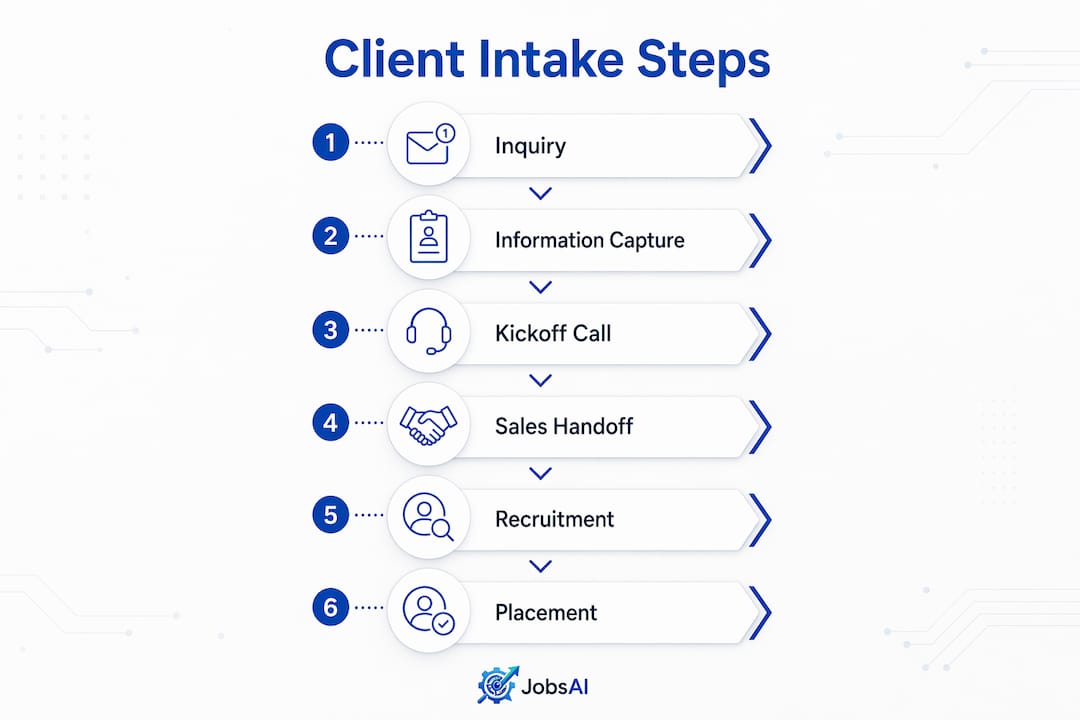
A well-run intake process follows a defined sequence. Each step has a clear owner, a deadline, and a documented output. Time-to-placement is usually lost in the gaps between steps, not within them.
- Send a welcome email within 2 hours of contract signing. The email confirms the engagement, introduces the delivery team, and sets expectations for what comes next. It should include a direct link to the client portal.
- Deliver the intake form within 24 hours. Do not wait for the kickoff call to collect basic information. Send the form immediately so the client can complete it on their own schedule.
- Collect all required documents within 48 hours. Job descriptions, org charts, compensation structures, and any compliance documents should be uploaded to the portal before the kickoff call. Chasing documents during the call wastes everyone’s time.
- Schedule and run the kickoff call within 72 hours. Industry SLA standards set 72 hours as the target for kickoff meetings after contract execution. Send a structured agenda at least 24 hours before the call. Kickoff meetings without a pre-sent agenda consistently produce misaligned expectations. The call itself should run 60–90 minutes and surface requirements that no intake form will capture.
- Send a written recap within 24 hours of the kickoff call. A recap email sent within 24 hours prevents the “we agreed on different things” disputes that typically surface within three weeks. The recap should confirm role priorities, timelines, communication cadence, and any special requirements discussed.
- Complete the internal handoff to the recruiting team the same day as the recap. The recruiter assigned to the search should receive the completed intake form, the kickoff recap, all uploaded documents, and a 15-minute verbal briefing from the account manager.
- Run a check-in call at day 7 and day 14. Early check-ins catch misalignment before it becomes a complaint. Top-performing staffing firms complete full onboarding within 14 days. The best 20% do it in 5 days or fewer using centralized portals and automation.
Pro Tip: Build your intake timeline into a shared project tracker, not just an email thread. When every step has a due date and an owner visible to the whole team, nothing falls through the cracks.
How can automation improve intake efficiency?
Automation does not replace the human judgment required in a good kickoff call. It eliminates the administrative work that slows everything else down.
The highest-value automation targets in a recruitment client intake workflow are:
- Automated intake form delivery: Triggered the moment a contract is marked as signed in your CRM. No one has to remember to send it.
- Document request reminders: Sent automatically at 24 and 48 hours if the client has not uploaded required files. This removes the awkward follow-up email and keeps the timeline on track.
- Portal progress tracking: Clients and account managers see exactly which steps are complete and which are pending. This eliminates the “did you get my documents?” email entirely.
- CRM field validation: Required fields cannot be left blank. The system flags incomplete records before they move to the next stage. Consistent activity logging within 4 hours maintains a single source of truth and reduces compliance exposure.
- Internal handoff triggers: When the intake form reaches 100% completion, the CRM automatically notifies the assigned recruiter and creates the first sourcing task.
The Jobsai Enterprise recruiting CRM supports all of these automation points in a single platform, which means your team spends less time managing the process and more time working the search. You can also explore workflow automation tools that connect intake triggers directly to sourcing tasks and follow-up sequences.
| Automation type | Manual equivalent | Time saved per client |
|---|---|---|
| Intake form delivery | Account manager sends email | 15–20 minutes |
| Document reminders | Manual follow-up calls or emails | 30–45 minutes |
| Portal progress tracking | Status update emails | 20–30 minutes |
| CRM field validation | Manual record audits | 10–15 minutes |
| Internal handoff trigger | Verbal or email briefing | 20–30 minutes |
What common intake mistakes should staffing teams avoid?
Most intake failures are predictable. They fall into four categories, and each one has a clear fix.
- Running a kickoff call without an agenda. A call without structure produces a conversation, not a brief. Send the agenda 24 hours before. Cover role priorities, sourcing strategy, communication cadence, and success metrics in that order.
- Collecting incomplete intake data. An intake form that asks for a job title and a start date is not an intake form. It is a placeholder. Incomplete data forces recruiters to go back to the client, which signals disorganization and wastes time on both sides.
- Missing SLA deadlines without communicating. The 12-hour response standard for new client inquiries and the 72-hour kickoff target exist because clients form their opinion of your firm in the first week. A missed deadline with no explanation is a trust problem, not just a scheduling problem.
- Failing to document edge cases from the sales conversation. The account manager who closed the deal knows things the recruiter does not. Verbal commitments, client preferences, and hiring manager quirks all belong in the CRM before the handoff happens. Documenting edge cases before contract signing prevents the delivery gaps that generate client complaints.
“Client onboarding quality is the strongest predictor of long-term client retention in staffing firms. Most early churn is traceable to an unstructured start rather than poor work quality.” Source: Kayako, 2026
Short, focused onboarding processes, even for short-term placements, significantly improve early performance and reduce avoidable errors. The discipline you apply at intake pays off throughout the entire engagement.
Key Takeaways
A structured client intake process is the single most reliable way to reduce early churn, accelerate placements, and build client trust from the first interaction.
| Point | Details |
|---|---|
| Complete onboarding fast | Top staffing firms finish client onboarding in 14 days; the best 20% do it in 5 days using portals and automation. |
| Capture the right data upfront | Intake forms must collect contacts, roles, timelines, budgets, and compliance requirements before the kickoff call. |
| Send a kickoff recap within 24 hours | A written recap sent the same day prevents expectation disputes that typically surface within three weeks. |
| Automate the administrative steps | Triggered form delivery, document reminders, and CRM validation remove manual follow-up without losing the human touch. |
| Document every edge case at handoff | Sales-to-delivery handoffs must include verbal commitments and client preferences logged in the CRM before the search begins. |
What I have learned from watching intake processes succeed and fail
By Hippolyte A.
After watching dozens of staffing teams run their intake processes, the pattern is consistent. The firms that retain clients long-term are not necessarily the ones with the best recruiters. They are the ones with the most disciplined intake process.
The kickoff call is where I see the most variance. Some teams treat it as a formality, a 20-minute call to confirm what the intake form already said. The best teams treat it as a discovery session. They send a structured agenda, they ask questions the client did not expect, and they send a written recap the same afternoon. That recap is not just a courtesy. It is a contract substitute. When a dispute arises six weeks later about what was agreed, the team with a written recap wins every time.
The other thing I have noticed is that intake forms tend to drift in one of two directions. They either become so long that clients abandon them halfway through, or they stay so short that recruiters are left guessing. The right balance is a form that takes under 15 minutes to complete and covers every field a recruiter actually needs to source the first candidate. Test your form by having a recruiter try to source from the data it produces. If they have questions, the form is incomplete.
Finally, the firms that struggle with retention almost always have weak CRM discipline. Activity is not logged. Fields are left blank. The handoff is verbal and undocumented. Consistent CRM logging is not glamorous work, but it is the infrastructure that makes everything else reliable.
— Hippolyte A.
How Jobsai Enterprise supports your client intake workflow
Jobsai Enterprise is built for staffing firms that want to run a faster, more consistent intake process without adding headcount.
The platform combines a client portal with workflow automation and a full recruiting CRM, so every intake step from form delivery to internal handoff runs on a defined trigger rather than a manual reminder. Recruiters get complete client records before the first sourcing task is created. Account managers get real-time visibility into where each onboarding stands. And your team spends less time chasing documents and more time placing candidates. See how the platform is built for staffing firms and what it takes to run intake at scale.
FAQ
What is a staffing agency client intake process?
The staffing agency client intake process is the structured sequence of steps that collects client information, aligns expectations, and prepares the recruiting team to begin sourcing. It typically runs from contract signing through the first week of active search.
How long should client onboarding take?
Top-performing staffing firms complete client onboarding in 14 days or fewer. The best 20% finish in 5 days or less using centralized portals and automation.
What should an intake form for clients include?
A complete intake form should capture primary and secondary contacts, open roles with job descriptions, target start dates, compensation ranges, sourcing preferences, and any compliance or background check requirements.
Why is the kickoff call recap so important?
A written recap sent within 24 hours of the kickoff call prevents expectation misalignment. Teams that skip the recap face “we agreed on different things” disputes within three weeks of the engagement starting.
How does CRM discipline affect client intake quality?
Logging all client activity within 4 hours and completing all required CRM fields maintains a single source of truth for the delivery team. It reduces compliance risk and prevents the information gaps that cause delivery failures during handoff.
Recommended
See it in your workflow
JobsAI Enterprise runs sourcing, AI screening, and the whole interview pipeline in one place. Book a walkthrough tailored to your team.
Book a demo