
Article
The I-9 Verification Process: A USCIS-Aligned Guide for Employers

The I-9 Verification Process: A USCIS-Aligned Guide for Employers
The I-9 verification process is the federally required workflow where every new hire attests to their identity and work authorization in Section 1, and the employer physically examines original documents and certifies that examination in Section 2. Completing Form I-9 is not optional for any U.S. employer, and the legal responsibility for accuracy sits with you, even when someone else fills out the form on your behalf.
The core deadlines are straightforward:
- Section 1 must be completed by the employee no later than their first day of work.
- Section 2 must be completed by the employer within three business days of the employee’s first day. If the job lasts fewer than three days, Section 2 is due on day one.
- Employers remain fully liable for errors on every form, including those completed by authorized representatives acting on their behalf.
When a new hire starts, your immediate sequence is: confirm Section 1 is complete, schedule the document review, examine original documents in person (or use an authorized remote procedure if eligible), and store the completed I-9 separately from the personnel file. Everything else in this guide builds on those four steps.
Key Takeaways
The I-9 verification process requires employees to attest to work authorization by their first day and employers to examine original documents and complete Section 2 within three business days, with full legal liability remaining with the employer regardless of who completes the form.
| Point | Details |
|---|---|
| Section 1 deadline | Employees must complete Section 1 no later than their first day of work. |
| Section 2 deadline | Employers must complete Section 2 within three business days, or by day one for jobs under three days. |
| Document acceptance | Accept one List A document, or one List B plus one List C document; never specify which to bring. |
| Retention rule | Keep I-9 forms for three years after hire or one year after termination, whichever is later. |
| Jobsai Enterprise | Jobsai Enterprise’s workflow automation and hiring manager workspace help track deadlines, assign reviewers, and maintain audit logs for I-9 compliance. |
Table of Contents
- What Is the I-9 Verification Process and Who Must Complete It?
- How to Complete Each Section of Form I-9, Step by Step
- Which Documents Can Employees Present for I-9 Verification?
- How to Inspect Documents Correctly and Avoid Discrimination
- How Long Do You Need to Keep I-9 Forms?
- What Happens During an I-9 Audit and How to Prepare
- How Does E-Verify Relate to Form I-9?
- Edge Cases: Remote Hires, Short-Term Jobs, Minors, and More
- How to Build I-9 Compliance Into Your Hiring Workflow
- The Part of I-9 Compliance Most HR Teams Get Wrong
- Jobsai Enterprise Helps You Keep I-9 Workflows on Track
- Sources
- FAQ
What Is the I-9 Verification Process and Who Must Complete It?
Form I-9, officially titled the Employment Eligibility Verification form, is the document U.S. employers use to verify that every person they hire for pay is authorized to work in the United States. USCIS administers the program, and the legal requirement applies to all employers, regardless of size, industry, or the number of employees they have.
The requirement covers every person hired for pay after November 6, 1986. That includes full-time, part-time, and temporary workers. It does not cover independent contractors or unpaid volunteers, but if you are unsure whether a worker’s classification triggers the requirement, treat it as if it does until you confirm otherwise.
Who completes which part:
- The employee completes Section 1, attesting to their identity and work authorization status.
- The employer (or an authorized representative) completes Section 2 after examining the employee’s documents.
- Supplement B handles reverification and rehire documentation when needed.
The official Form I-9 instructions describe all three parts in detail, including the exact fields, timing requirements, and signature obligations. The M-274 Handbook for Employers is USCIS’s practical companion guide and the first place to check when you encounter an edge case.
Always download the current version of Form I-9 directly from USCIS. Using an outdated version is itself a compliance violation, and the Lists of Acceptable Documents on the form’s final page must match the current USCIS-published list.
How to Complete Each Section of Form I-9, Step by Step
Getting the form right means following a specific sequence. Mistakes in the order of operations, not just in the data fields, are among the most common audit findings.
Step 1: Employee completes Section 1
The employee fills out Section 1 on or before their first day of work. They may not complete it before they have accepted a job offer. The section collects:
- Full legal name and any other last names used
- Current address and date of birth
- Social Security number (required if the employer uses E-Verify)
- Citizenship or immigration status attestation (one of four checkboxes)
- Signature and date
If the employee needs a preparer or translator, that person completes Supplement A, not Section 1 itself. The employee still signs Section 1 personally.
Step 2: Employer completes Section 2
You must complete Section 2 within three business days of the employee’s first day. If someone starts on a Monday, Section 2 is due by Thursday. For jobs lasting fewer than three business days, Section 2 must be done by day one.
In Section 2, you record:
- The document title, issuing authority, document number, and expiration date from the document(s) the employee presents.
- The employee’s first day of employment.
- Your signature, title, and the date you completed the section.
- Your employer name and business address.
Do not back-date Section 2 to match the hire date if you completed it later. Record the actual date you examined the documents. Back-dating is one of the clearest audit red flags and can convert a paperwork violation into a fraud finding.
Correcting mistakes: Draw a single line through the error, enter the correct information, and initial and date the correction. Never use correction fluid or overwrite an entry. If the error is in Section 1, the employee must make the correction, not you.
Section 2 timeline at a glance
| Event | Deadline |
|---|---|
| Employee accepts offer | Section 1 may now be completed |
| Employee’s first day of work | Section 1 must be complete by end of day |
| Three business days after first day | Section 2 must be complete (standard rule) |
| Job lasts fewer than three days | Section 2 must be complete by first day |
| Work authorization expiration | Reverification due before expiration date |
Supplement B: reverification and rehire
Use Supplement B when an employee’s work authorization expires and needs reverification, or when you rehire someone within three years of their original I-9 date. For a rehire, you may either complete a new Form I-9 or use Supplement B on the existing form. For a name change, record the new name in Supplement B. Do not alter Section 1 after the employee has signed it.
Which Documents Can Employees Present for I-9 Verification?
Employees choose which documents to present. You cannot tell them which specific document to bring, and doing so can trigger a discrimination complaint. Your job is to accept any document from the Lists of Acceptable Documents that reasonably appears to be genuine.
List A, List B, and List C explained
List A documents establish both identity and work authorization in a single document. An employee who presents one List A document is done. Common examples include:
- U.S. Passport or U.S. Passport Card
- Permanent Resident Card (Form I-551, also called a Green Card)
- Employment Authorization Document (Form I-766)
- Foreign passport with a Form I-94 showing unexpired employment authorization
List B documents establish identity only. List C documents establish work authorization only. An employee who does not have a List A document must present one from each list. Common examples:
- List B: State-issued driver’s license, state ID card, school ID with photo (for minors)
- List C: Social Security card (unrestricted), U.S. birth certificate, Form I-94 with certain endorsements
Acceptable document combinations
| List | Purpose | Example documents |
|---|---|---|
| List A | Identity + work authorization | U.S. Passport, Green Card, EAD (Form I-766) |
| List B | Identity only | Driver’s license, state ID card |
| List C | Work authorization only | Unrestricted Social Security card, U.S. birth certificate |
An employee presents either one List A document or one List B document plus one List C document. Never require both a List A document and a List B/C combination.
Receipts: when they are acceptable
A receipt is a temporary stand-in for a document the employee does not yet have in hand. Three receipt situations are permitted:
- Lost, stolen, or damaged document: The employee presents a receipt showing they applied for a replacement. They must present the actual document within 90 days of their first day of work.
- Refugee admission: A refugee who presents a Form I-94 with a refugee admission stamp may use it as a receipt for a List A document. They must present an EAD within 90 days.
- Pending I-551: A foreign passport with a temporary I-551 stamp or printed notation is acceptable as a List A document, not just a receipt.
Track receipt expiration dates carefully. When the 90-day window closes, you must see the actual document and update Section 2 or Supplement B accordingly.
Special cases: Minors under 18 who cannot produce identity documents may present a List C document plus a parent or guardian’s written statement. Individuals with disabilities in special-placement programs have additional accommodations described in the M-274 Handbook.
How to Inspect Documents Correctly and Avoid Discrimination
Document inspection is where many employers create liability without realizing it. The standard is that documents must reasonably appear to be genuine and to relate to the person presenting them. You are not expected to be a forensic document examiner. You are expected to look carefully and act in good faith.
What to do when examining documents:
- Examine original, unexpired documents in person. Photocopies are not acceptable, with one exception: certified copies of birth certificates are permitted.
- Check that the document appears genuine on its face: consistent fonts, no visible alterations, photo matches the employee.
- Confirm the document has not expired. An expired document is not acceptable, even if the employee explains the renewal is pending.
- Record the document details in Section 2 exactly as they appear on the document.
What not to do:
- Do not reject a document that appears genuine simply because you are unfamiliar with it. USCIS publishes a document reference guide, and the M-274 includes visual examples.
- Do not request more or different documents than the employee chooses to present. Asking for a specific document when the employee has already presented an acceptable one is a discrimination risk.
- Do not accept photocopies of List A or List B documents. Only certified birth certificates (a List C document) are an exception.
Authorized representatives
Any person you designate can act as your authorized representative to complete Section 2. There is no USCIS-approved list of who qualifies. A notary public, a colleague in another office, or a trusted third party can all serve in this role. The critical point: you retain full legal liability for whatever the representative does. If they accept an expired document or fill out Section 2 incorrectly, the violation is yours.

Train anyone you designate as an authorized representative before they examine a single document. Give them a written checklist and confirm they understand they cannot accept photocopies.
What to do if a document does not appear genuine: Do not accuse the employee. Allow them to present other documents from the Lists. Document your observation in your internal records and consult legal counsel if the situation escalates.
Pro Tip: During high-volume onboarding periods, assign a single trained reviewer to handle all Section 2 examinations for a given week rather than rotating the task among multiple staff members. Consistency in the reviewer reduces variation in how documents are evaluated and creates a cleaner audit trail.
How Long Do You Need to Keep I-9 Forms?
The retention rule has two parts, and you keep the form until whichever deadline is later:
- Three years after the employee’s hire date, OR
- One year after the employee’s termination date
For a long-tenured employee, the three-year rule rarely applies because one year after termination will almost always be the later date. For a short-term hire who works for only a few months, the three-year rule from the hire date will typically control.
Storage best practices:
- Store I-9 forms in a dedicated I-9 file, completely separate from personnel files. Mixing them makes it harder to produce forms quickly during an audit and creates privacy risks.
- Maintain a chain-of-custody log for who has accessed the I-9 file.
- Restrict access to HR staff with a legitimate need. I-9 files contain sensitive personal information.
- Label each form with the hire date and termination date so you can calculate the destruction date without recalculating from scratch.
- Establish a documented destruction policy and follow it. Keeping forms longer than required is not a safety net; it expands your audit exposure.
Electronic I-9 systems
The fillable PDF version of Form I-9 does not meet DHS standards for electronic generation, storage, and retention. Saving a completed PDF to a shared drive is not a compliant electronic I-9 system. If you want to manage I-9s electronically, you need a system that meets DHS requirements, including audit logs, access controls, and an electronic signature process that complies with federal standards.
Any compliant electronic system must maintain an audit trail showing who completed each entry, when, and from what device. That audit trail is what auditors look for first when they review electronic I-9 records.
What Happens During an I-9 Audit and How to Prepare
ICE and the Department of Homeland Security conduct I-9 audits through a Notice of Inspection (NOI). When you receive one, you typically have three business days to produce your I-9 forms. That timeline is not negotiable, which is why audit-readiness is a standing operational requirement, not a one-time project.
Common violations auditors find:
- Section 2 completed after the three-business-day deadline
- Missing signatures or dates in any section
- Expired documents accepted at the time of hire
- Back-dated entries in Section 2
- Failure to reverify employees whose work authorization has expired
- Specifying which documents an employee must present (a discrimination violation)
- Using an outdated version of Form I-9
Penalty exposure: USCIS and ICE can assess civil money penalties for I-9 violations. The penalty range varies based on the type and number of violations, whether violations are paperwork-only or substantive, and whether the employer has prior violations. Consult the USCIS enforcement page directly for current penalty ranges, as figures are subject to adjustment.
Key enforcement principle: Paperwork violations and substantive violations carry different penalty weights. An employer who consistently completes Section 2 one day late faces a different exposure than one who knowingly accepts fraudulent documents. Auditors distinguish between systemic failures and isolated errors, and your internal audit records are the primary evidence of which category applies to you.
Audit-prep checklist:
- Conduct an internal I-9 audit at least once per year, reviewing a random sample of current and terminated employee forms.
- Correct any technical errors you find using the single-line correction method before an audit notice arrives.
- Maintain a log of every I-9 review, including who reviewed it and when.
- Keep a complete list of current employees with their hire dates and work authorization expiration dates.
- Retain legal counsel contact information for immediate use if an NOI arrives.
- Do not destroy any I-9 forms once an audit notice is received, even if the retention period has passed.
The compliance role in recruiting extends well beyond the I-9 itself, but the I-9 is the document auditors request first. Getting it right is the baseline.
How Does E-Verify Relate to Form I-9?
E-Verify is a separate, web-based system operated by USCIS and the Social Security Administration that allows employers to electronically confirm an employee’s work authorization. It does not replace Form I-9. E-Verify begins with a completed Form I-9: you enter the information from the form into the E-Verify system, and the system checks it against federal databases.
When E-Verify is required:
- Federal contractors and subcontractors subject to the Federal Acquisition Regulation (FAR) E-Verify clause must use it.
- Several states have enacted laws requiring some or all employers to use E-Verify. Requirements vary by state and employer size.
- All other employers may use E-Verify voluntarily.
Benefits and limits of E-Verify:
- E-Verify provides a near-real-time confirmation or tentative non-confirmation (TNC) of work authorization.
- A TNC does not mean the employee is unauthorized. It means the databases did not match, and the employee has the right to contest the result.
- E-Verify does not verify document authenticity. It checks data, not the physical document.
Remote document examination for E-Verify participants
Employers who are enrolled in E-Verify and meet DHS eligibility requirements may use an alternative procedure for remote document examination. Under this procedure, the employee submits copies of their documents remotely, and the employer examines them via live video interaction rather than in person. The employer must check the “alternative procedure” checkbox in Section 2 and retain copies of the documents examined.
This alternative is not available to employers who are not enrolled in E-Verify. For government and public-sector hiring teams that are already E-Verify participants, this remote option can simplify onboarding for distributed workforces.
Edge Cases: Remote Hires, Short-Term Jobs, Minors, and More
Most I-9 situations follow the standard workflow. A handful of scenarios require a different approach, and getting them wrong tends to produce the same violations as the common cases, just in less obvious ways.
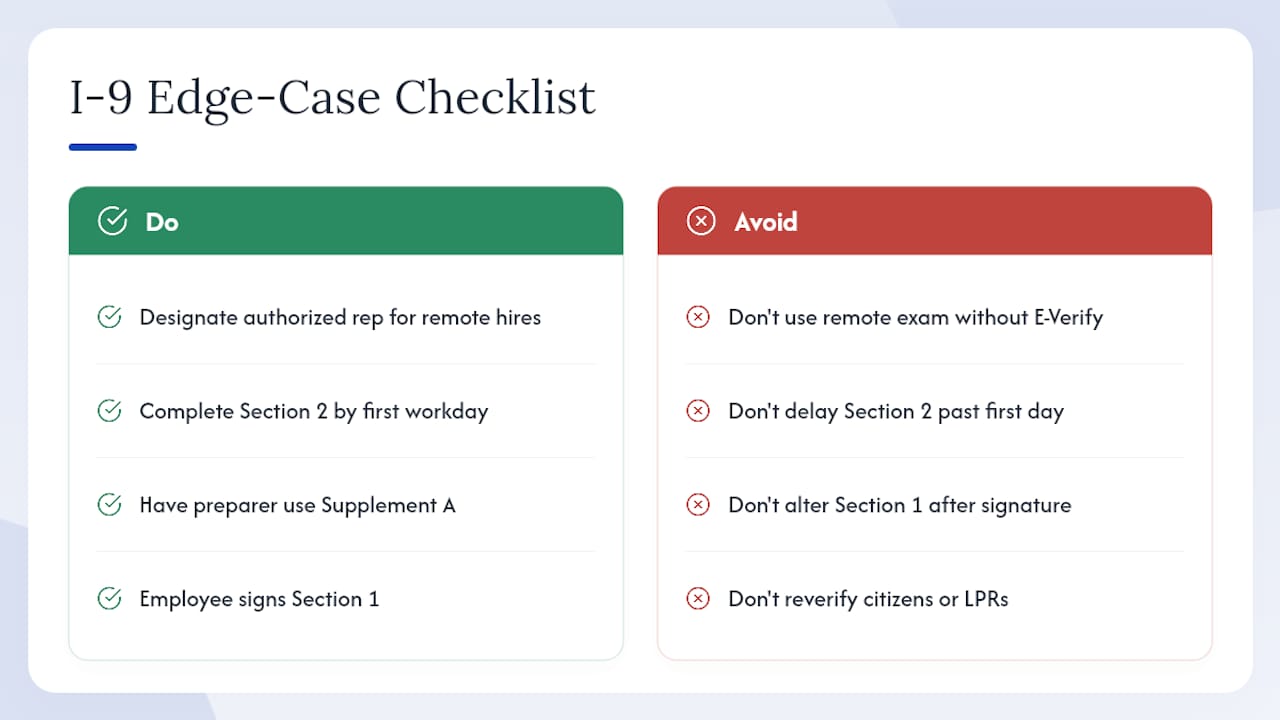
Remote hires: If you are not enrolled in E-Verify, you cannot use the alternative remote examination procedure. Instead, designate an authorized representative at or near the employee’s location to complete Section 2 in person. Document the representative’s name and title in Section 2. You remain fully liable for their work.
Jobs lasting fewer than three business days: Section 2 must be complete by the employee’s first day of work, not within three days. This is the most frequently missed timing rule for short-term and gig-style engagements.
Preparer or translator assistance: If an employee needs help completing Section 1, the preparer or translator completes Supplement A, not Section 1. Each preparer or translator signs their own block in Supplement A. The employee still signs Section 1.
Rehires within three years: If you rehire someone within three years of the date their original Form I-9 was completed, you may either complete a new Form I-9 or complete Supplement B on the existing form. Check whether the employee’s work authorization has expired; if it has, reverification is required.
Reverification triggers: Reverification is required when an employee’s work authorization expires. It is not required for U.S. citizens or lawful permanent residents. Use Supplement B, record the new document information, and sign and date the entry before the expiration date, not after.
Minors: A minor who cannot produce a List B identity document may present a List C document plus a parent or guardian’s written statement explaining the minor’s inability to produce an identity document. The M-274 Handbook covers this scenario in detail and should be your reference for any situation not covered by the standard form instructions.
Name changes: Do not alter Section 1 after the employee has signed it. Record the name change in Supplement B, noting the old name, the new name, and the date of the change.
How to Build I-9 Compliance Into Your Hiring Workflow
Knowing the rules is one thing. Building them into a repeatable process that holds up across dozens of hires per month is where most HR teams struggle. The gap between knowing the three-business-day rule and actually hitting it every time is usually an operational problem, not a knowledge problem.
Implementation checklist for embedding I-9 tasks into your ATS workflow:
- Assign Section 1 completion as a pre-day-one task in your onboarding system, triggered automatically when an offer is accepted.
- Set a Section 2 deadline alert for three business days after the hire date, routed to the designated reviewer.
- Log the name and contact information of any authorized representative used for remote Section 2 completion.
- Flag work authorization expiration dates at the time of hire and set a reverification reminder 90 days before expiration.
- Track receipt expiration dates separately and create a follow-up task for the 90-day document exchange.
- Record the document review date, reviewer name, and document details in a centralized compliance log.
What automation can and cannot do: Workflow automation handles reminders, deadline tracking, document-upload prompts, and audit logs well. It cannot replace the physical examination of original documents where that examination is required. No software substitutes for a trained reviewer looking at an original passport or driver’s license. Workflow automation is an operational control that reduces the chance of missing a step; it does not transfer legal responsibility.
Metrics worth tracking:
- On-time Section 2 completion rate (target: 100%)
- Percentage of I-9s with at least one missing or incorrect field
- Number of audit findings per internal review cycle
- Percentage of employees with expiring work authorization flagged 90+ days in advance
Onboarding compliance varies across roles and regions, and a centralized compliance dashboard makes it easier to spot patterns before they become audit findings. Consistent hiring criteria, including consistent I-9 procedures, also reduce the risk of discrimination claims that arise when different reviewers apply different standards to different employees.
Compliance caveat: Technology is an operational control, not a legal substitute. Employers remain legally responsible for the accuracy, completeness, and timely retention of every Form I-9, regardless of which system they use to manage the process.
The Part of I-9 Compliance Most HR Teams Get Wrong
Most I-9 training focuses on the form itself: which fields to fill in, which documents to accept, how long to keep the records. That knowledge is necessary. But the compliance failures that show up most often in audits are not knowledge failures. They are process failures.
The three-business-day rule for Section 2 is one of the most widely known I-9 requirements. It is also one of the most commonly violated, not because HR teams forget it exists, but because no one owns the task on a specific hire. The offer goes out, the start date gets set, and Section 2 falls into the gap between HR, the hiring manager, and whoever happens to be in the office that week.
The same pattern applies to reverification. Employers know they need to reverify expiring work authorization. What they often lack is a system that surfaces the expiration date 90 days out, assigns the task to a specific person, and confirms it was completed. By the time the expiration date arrives, the window has closed.
Authorized representatives create a similar blind spot. Delegating Section 2 to someone at a remote location is a legitimate and often necessary solution. But the employer’s liability does not travel with the delegation. If the representative accepts a photocopy, accepts an expired document, or fills in the wrong date, the violation belongs to the employer. Training authorized representatives is not optional; it is the only way to manage that liability.
The practical priority order for any HR team building or auditing their I-9 process: get the timelines right first, then the document inspection quality, then the recordkeeping. All three matter, but a late Section 2 is an automatic violation regardless of how well the documents were examined.
Jobsai Enterprise Helps You Keep I-9 Workflows on Track
Completing Form I-9 correctly every time requires more than knowing the rules. It requires a process that assigns tasks, tracks deadlines, and surfaces exceptions before they become violations. That is where Jobsai Enterprise fits.
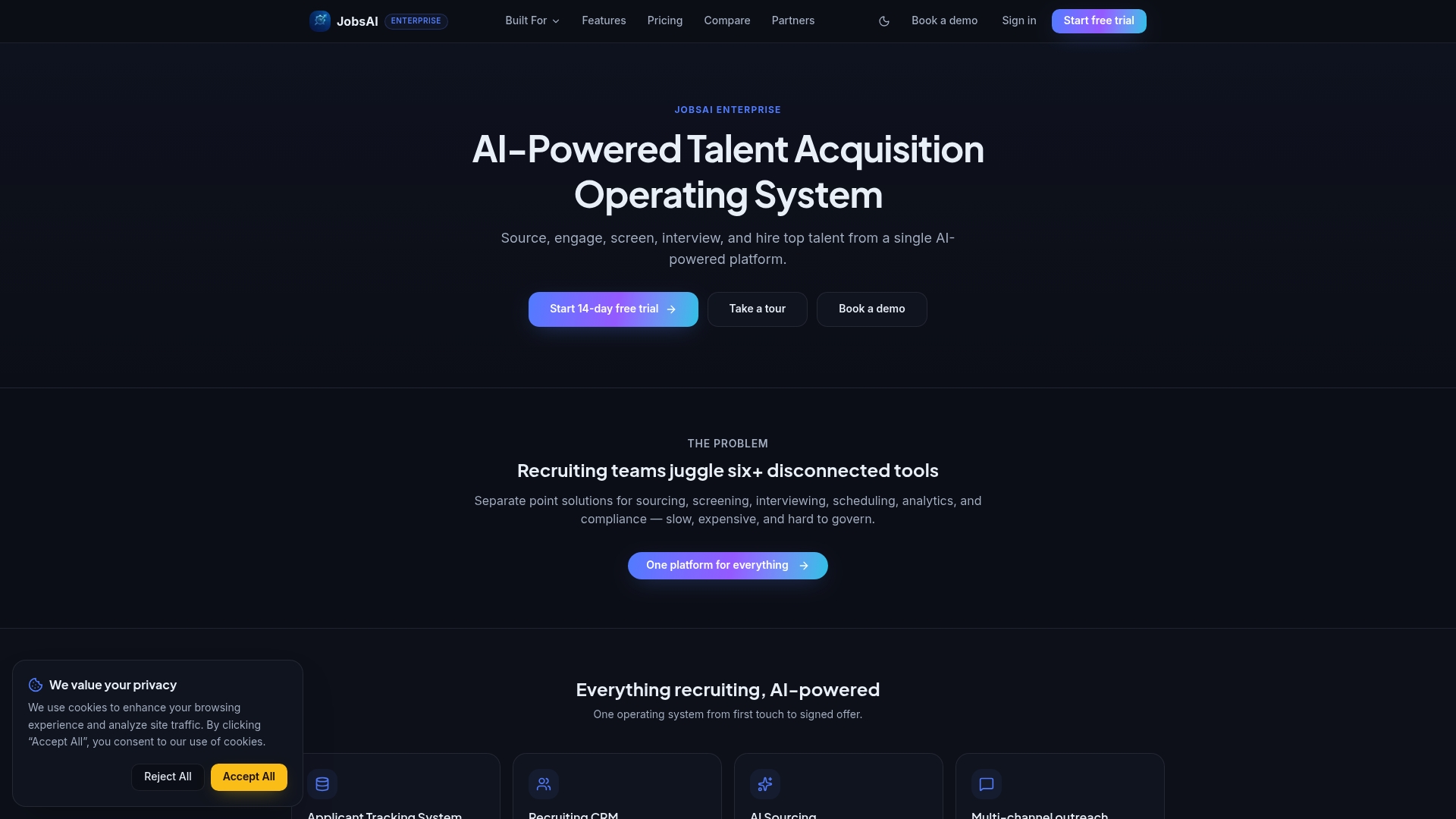
Jobsai Enterprise’s hiring manager workspace gives your team a centralized place to track onboarding tasks, including Section 1 and Section 2 deadlines, document review assignments, and reverification alerts. Automated reminders reduce the chance of a missed three-business-day window, and the audit log captures who completed each step and when, which is exactly what auditors ask for first. For corporate HR teams managing high-volume hiring across multiple locations, that kind of structured visibility makes a measurable difference in on-time completion rates.
See how it works for your team: explore Jobsai Enterprise pricing or take a product tour to see the workflow automation features live.
Jobsai Enterprise assists with operational workflows; employers retain full legal responsibility for I-9 accuracy, completeness, and retention under USCIS requirements.
Sources
Every rule in this guide traces back to official USCIS and E-Verify publications. Use these directly to download current forms, verify any statute-level detail, and confirm that the Lists of Acceptable Documents you are using are up to date.
Check these pages directly whenever you hire, because USCIS updates the form and instructions periodically. An outdated form version is a compliance violation on its own.
This article is general information, not a substitute for advice from a qualified lawyer. Consult a qualified legal professional about your own circumstances before acting on anything here.
FAQ
What happens during the I-9 verification process?
The employee completes Section 1 by their first day of work, attesting to their identity and work authorization status. The employer then physically examines original documents the employee presents and completes Section 2 within three business days of the first day of employment.
How long does I-9 verification take?
Section 1 takes most employees five to ten minutes to complete. Section 2 typically takes the employer a few minutes once the employee presents their documents. The three-business-day window is the compliance deadline, not the expected duration.
How much does I-9 verification cost?
There is no fee to complete Form I-9. The form is free to download from USCIS. E-Verify participation is also free for employers, though third-party I-9 management software carries its own subscription costs.
What documents are required for I-9 verification?
Employees must present either one List A document (such as a U.S. Passport or Green Card) or one List B document plus one List C document (such as a driver’s license and an unrestricted Social Security card). Employers cannot specify which documents an employee must bring.
Can I complete Form I-9 remotely?
Remote document examination is permitted only for employers enrolled in E-Verify who meet DHS eligibility requirements for the alternative procedure. All other employers must examine original documents in person, though they may designate an authorized representative at the employee’s location to do so on their behalf.
Recommended
See it in your workflow
JobsAI Enterprise runs sourcing, AI screening, and the whole interview pipeline in one place. Book a walkthrough tailored to your team.
Book a demo