
Article
Candidate Relationship Management: A Recruiter's Practical Guide

Candidate Relationship Management: A Recruiter’s Practical Guide
Candidate relationship management (CRM) is the practice of building and maintaining ongoing relationships with candidates before, during, and after the hiring process — so your talent pipelines stay full, your time-to-hire drops, and candidates actually want to work with you. As SocialTalent defines it, candidate relationship management treats candidates as long-term relationships rather than one-time transactions, borrowing directly from marketing CRM techniques: capture early, segment by fit, nurture with relevant content, convert when the role opens, and measure what worked.
Two benefits stand out immediately:
- Stronger pipeline quality. Re-engaging past applicants and sourced contacts means you’re not starting from zero every time a role opens.
- Faster time-to-hire. Warm candidates who already know your brand move through the process faster than cold outreach ever will.
Key Takeaways
Candidate relationship management works when it combines clean data, consistent segmentation, and integrated technology — without those three, even the best campaign strategy underperforms.
| Point | Details |
|---|---|
| Start with segmentation | Tag records by role family, skill, and pipeline stage before running any campaigns. |
| Integrate ATS and CRM first | Bi-directional sync with deduplication is a launch prerequisite, not a phase-two task. |
| Measure CRM-sourced hires separately | Cost-per-hire and time-to-hire from CRM cohorts are the clearest ROI signals for leadership. |
| Pilot before scaling | Run your first campaign with one segment of 200–500 records to surface bugs and content gaps. |
| Jobsai Enterprise | Combines recruiting CRM, AI matching, campaign automation, and ATS in one platform for agencies and HR teams. |
Table of Contents
- What is candidate relationship management and how does the CRM lifecycle work?
- How does a candidate CRM differ from an ATS, and when do you need both?
- What features should candidate relationship management software include?
- What are the real benefits of using a candidate CRM?
- How to implement candidate CRM: a step-by-step playbook
- Which KPIs actually measure CRM success?
- How is AI changing candidate relationship management?
- Common pitfalls in CRM adoption and how to fix them
- A self-audit to evaluate your CRM readiness right now
- What it actually takes to run CRM as a strategic capability
- Jobsai Enterprise brings CRM and AI together in one hiring workspace
- Sources
- FAQ
What is candidate relationship management and how does the CRM lifecycle work?
Gartner’s CRM software category describes a five-stage lifecycle that separates mature recruiting operations from reactive ones: Capture → Segment → Engage → Convert → Measure. Each stage has a distinct job.
The contrast with transactional recruiting is worth naming directly. Traditional recruiting opens a req, posts a job, reviews applicants, and closes. CRM flips that sequence. You build the relationship before the req exists, so when it opens, you’re selecting from a warm pool rather than broadcasting to strangers.
The five stages in practice
- Capture. Collect candidates through career site landing pages, events, employee referrals, sourcing campaigns, and inbound applications. Every touchpoint is an entry point.
- Segment. Tag records by role family, skill set, location, experience level, and pipeline status. Without this step, a database of 50,000 records produces almost no usable signal — Spiceworks notes that segmentation and tagging are the operational keys to targeted re-engagement.
- Engage. Run drip campaigns, share relevant content, and invite candidates to events. The goal is to keep your employer brand top of mind without spamming.
- Convert. When a role opens, surface the right segment, reach out with a personalized message, and move qualified candidates into the ATS for active consideration.
- Measure. Track open rates, reply rates, conversion from CRM contact to applicant to hire, and cost-per-hire by source. These numbers justify the investment.
Pro Tip: Keep your segmentation model to six or fewer primary tags per candidate at launch. Teams that build 20-tag taxonomies on day one end up with inconsistent data inside 90 days. Start simple, add complexity only when a business need demands it.
How does a candidate CRM differ from an ATS, and when do you need both?
The short answer: your ATS runs active hiring workflows; your CRM manages relationships outside those workflows. They serve different masters.
An ATS owns the application, the interview process, the offer, and the compliance record. A CRM owns the relationship before the application exists and after a candidate is declined or placed. SocialTalent’s definition is clear that a mature CRM operation integrates tightly with the ATS so candidate records flow between relationship and application states without creating data silos.
| Dimension | ATS | Candidate CRM |
|---|---|---|
| Primary record | Active application | Relationship / talent community record |
| Automation focus | Interview scheduling, offer workflows | Drip campaigns, event invites, nurture sequences |
| Analytics focus | Time-to-fill, pipeline stage conversion | Engagement rates, source quality, CRM-to-hire conversion |
| Candidate state | Actively applying | Passive, silver medallist, past applicant, sourced |
| Compliance role | EEO/OFCCP recordkeeping | Opt-in/opt-out, GDPR/CCPA consent management |
When a dedicated CRM is worth the investment
Most ATS platforms include basic CRM features: a talent pool, some email templates, maybe a campaign tool. For teams hiring fewer than 200 roles per year with low complexity, those native features are often sufficient. The case for a dedicated CRM grows when you’re managing high-volume or hard-to-fill roles, running proactive sourcing programs, or building talent communities across multiple job families. At that point, the segmentation depth, campaign personalization, and analytics granularity of a purpose-built CRM pay for themselves.
Pro Tip: When evaluating integration between your ATS and CRM, confirm that the integration handles record deduplication and canonical identity resolution — meaning a candidate’s relationship profile and application history stay synchronized, not duplicated. A candidate who applies twice should have one record, not two.
What features should candidate relationship management software include?
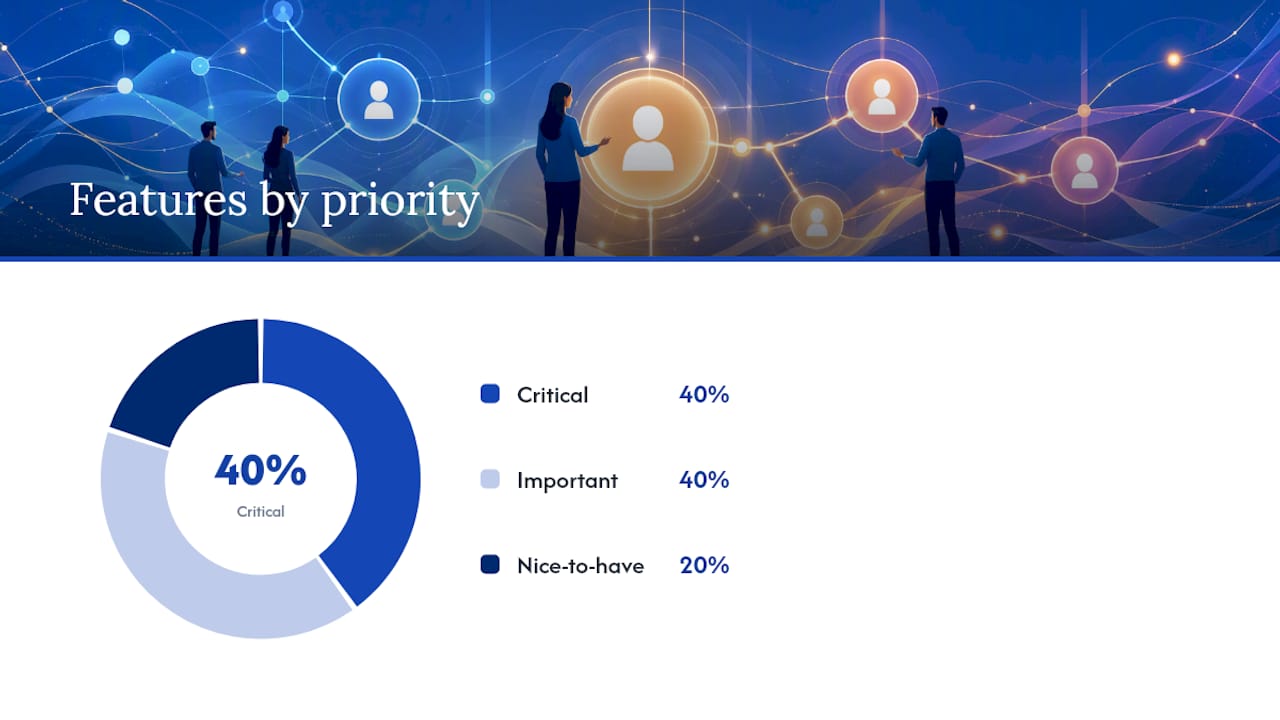
Gartner’s category definition lists the core capabilities: talent pools, campaign automation, branded career sites, AI-powered chatbots, and landing page builders. Here’s how to prioritize them by the hiring outcome each one drives.
Feature checklist by priority
Critical for all teams:
- Talent pools and candidate database. Organizes records by segment, tracks relationship history, and surfaces candidates when a role opens. Without this, you have a contact list, not a CRM.
- Segmentation and tagging. Lets you slice your database by role interest, skill, location, and pipeline stage. The candidate database and talent pools guide from Jobsai Enterprise covers practical tagging models worth reviewing.
- Campaign automation (email/SMS). Sends drip sequences, event invitations, and re-engagement messages at scale without manual effort per send.
- ATS and HRIS integrations. Bi-directional sync keeps relationship data and application data aligned. A CRM that doesn’t talk to your ATS creates the exact silos you’re trying to eliminate.
Important for mid-market and enterprise teams:
- AI matching and recommendations. Surfaces candidates from your existing database who fit a new req, reducing sourcing time for repeat role types.
- Landing pages and career microsites. Captures inbound interest from campaigns, events, and job boards without requiring candidates to apply immediately.
- Event and virtual recruiting support. Manages registrations, follow-up, and post-event nurture for career fairs and info sessions.
- Analytics and reporting. Tracks engagement rates, conversion by segment, and source-of-hire so you can cut what isn’t working.
Nice-to-have for mature programs:
- Predictive analytics. Scores segments by likelihood to convert based on historical engagement patterns.
- AI chatbots. Provides immediate response to inbound candidates on career sites, capturing interest 24/7.
Prioritization note: Mid-market TA teams (50–500 hires per year) should lock in talent pools, campaign automation, and ATS integration before evaluating AI features. Enterprise teams running proactive sourcing programs at scale will find AI matching and predictive analytics move from nice-to-have to necessary once the database exceeds a few thousand active records.
Pro Tip: During any vendor trial, send a five-email drip sequence to a test segment and check deliverability rates, personalization token accuracy, and unsubscribe handling. Campaign execution quality varies significantly across platforms and rarely shows up in demo environments.
What are the real benefits of using a candidate CRM?
The business case for CRM sits on four pillars: deeper pipelines, faster hiring, lower sourcing cost, and a better candidate experience. Indeed’s career advice resource notes that organizations in tight talent markets convert past applicants and sourced contacts into faster hires while also surfacing reasons for talent leakage through ongoing engagement.
- Pipeline depth. Silver medallists, past applicants, and sourced contacts who didn’t convert the first time represent a pre-qualified pool. Re-engaging them costs a fraction of sourcing net-new candidates.
- Faster time-to-hire. Warm candidates who’ve already engaged with your brand skip the awareness phase entirely. Time-to-hire is usually lost in the gaps between steps, and CRM compresses those gaps.
- Lower cost-per-hire. Gartner’s CRM category data points to lower cost-per-hire from CRM-sourced cohorts as one of the clearest ROI signals teams can measure.
- Stronger candidate experience. Personalized, timely communication — even when there’s no open role — signals that your organization respects candidates’ time. That reputation compounds over time.
- Reduced talent leakage. Structured follow-up and surveying help you understand why candidates drop off, so you can fix the process rather than repeat the same loss.
For engagement tracking metrics that tie these benefits to measurable outcomes, Jobsai Enterprise’s recruiter guide covers the dashboard setup in practical detail.
How to implement candidate CRM: a step-by-step playbook
A CRM launch that skips governance fails within six months. Here’s a sequenced approach that holds.
90-day implementation checklist
- Audit your current data (Days 1–14). Export existing candidate records from your ATS, job boards, and spreadsheets. Identify duplicates, missing fields, and consent gaps. This is unglamorous but non-negotiable.
- Define your data model (Days 7–21). Decide on your segmentation taxonomy: role families, skill clusters, pipeline stages, and source tags. Keep it to six or fewer primary tags per record.
- Configure integrations (Days 14–30). Connect your CRM to your ATS and calendar. Confirm bi-directional sync and deduplication rules before importing any records.
- Build your content plan (Days 21–45). Map one nurture sequence per major segment. Each sequence needs at least three touchpoints: an intro, a value-add (content, event invite, or insight), and a soft conversion ask.
- Launch a pilot campaign (Days 30–60). Pick one segment — ideally a role family with a history of hard-to-fill positions — and run your first drip sequence. Measure open rates, reply rates, and conversions.
- Expand and optimize (Days 60–90). Apply lessons from the pilot to additional segments. Refine messaging, adjust send cadence, and confirm your ATS integration is passing clean data.
- Establish governance (Ongoing). Assign a data steward to manage tagging consistency, a campaign owner for content, and a TA leader for quarterly audits.
Governance and ownership
Spiceworks recommends treating CRM as cross-functional: TA owns the pipeline and conversion goals, employer brand owns the content and tone, and marketing contributes segmentation strategy. Teams that keep CRM strictly within TA tend to produce generic content that underperforms.
Pro Tip: Run your pilot with a segment of 200–500 records, not your full database. A small pilot surfaces integration bugs, consent issues, and content gaps before they affect thousands of candidates.
Pro Tip: Set a duplicate-resolution rule on day one: if a candidate exists in both your ATS and CRM, the ATS record is canonical for application data, and the CRM record is canonical for relationship history. Without this rule, your teams will create conflicting records within weeks.
Which KPIs actually measure CRM success?
SocialTalent’s CRM definition identifies the core metric groups: source-of-hire reporting, cost-per-hire by source, conversion rates from CRM segments to hires, and time from CRM contact to hire. These are the numbers that justify CRM investment to leadership.
| KPI | Definition | How to calculate | Report cadence |
|---|---|---|---|
| Email open rate | % of sent messages opened | Opens ÷ delivered | Weekly |
| Reply / response rate | % of recipients who replied or clicked | Replies ÷ delivered | Weekly |
| CRM-to-applicant conversion | % of CRM contacts who applied | Applicants from CRM ÷ total CRM contacts | Monthly |
| CRM-to-hire conversion | % of CRM contacts who were hired | Hires from CRM ÷ total CRM contacts | Monthly |
| Time from CRM contact to hire | Days between first CRM touch and hire date | Average across CRM-sourced hires | Monthly |
| Cost-per-hire by source | Total sourcing cost ÷ hires by source | Segment CRM-sourced hires separately | Quarterly |
| Pipeline coverage ratio | Open reqs covered by CRM segments | Reqs with qualified CRM candidates ÷ total open reqs | Weekly |
Reporting templates
Weekly recruiter dashboard: open rate, reply rate, pipeline coverage ratio, and new records added by source. This tells recruiters whether their outreach is landing and whether the database is growing.
Monthly executive summary: CRM-to-hire conversion, time from CRM contact to hire, and cost-per-hire by source compared to non-CRM hires. This is the business case in three numbers.
For candidate engagement tracking setup and dashboard templates, Jobsai Enterprise’s guide walks through the technical configuration in detail.
Measurement note: Teams that track CRM-sourced hires separately from job board hires consistently find a lower cost-per-hire from the CRM cohort. That gap is the clearest single argument for CRM investment in a budget conversation.
How is AI changing candidate relationship management?
AI enables scalable personalization, smarter matching, automated outreach sequencing, and better analytics. SHRM’s reporting on AI in CRM identifies four specific use cases that are already in production at recruiting teams: personalized messaging at scale, AI-driven candidate matching, chatbots for immediate engagement, and predictive analytics for segment prioritization.
What AI actually does in a CRM workflow
- AI matching. Scans your existing talent pool against a new req’s requirements and surfaces the top candidates without a manual search. This is where the time savings are most immediate for high-volume teams.
- Personalized drip sequences. AI generates message variants tailored to a candidate’s role interest, experience level, and engagement history. The result is higher open and reply rates compared to generic templates.
- Chatbots on career sites. Captures inbound interest in real time, answers common questions, and routes candidates to the right talent pool without recruiter involvement. A candidate who visits your career site at 10 PM gets a response, not a bounce.
- Predictive analytics. Scores segments by likelihood to convert based on historical patterns, so recruiters prioritize outreach to the segments most likely to produce hires.
A practical AI-assisted workflow
A recruiter opens a new software engineering req. The AI matching engine scans the CRM, surfaces 40 candidates who match the skill profile and have engaged with at least two prior touchpoints. The recruiter reviews the shortlist, selects 20, and triggers a personalized outreach sequence. Candidates who reply move to the ATS. The whole sourcing step takes under an hour instead of a day.

SHRM also notes that AI can increase candidate engagement by enabling higher-frequency, personalized touchpoints at scale, but teams must add human oversight to manage tone and mitigate bias.
Pro Tip: When piloting AI matching, run a parallel-control test: have a recruiter build a manual shortlist and let the AI build one independently, then compare. Run this for at least one full hiring cycle before relying on AI matching alone. It surfaces both the model’s strengths and its blind spots.
For a clear breakdown of which recruiting tasks to automate and which to keep human, the AI in recruiting guide from Jobsai Enterprise is a practical starting point.
Common pitfalls in CRM adoption and how to fix them
Most CRM programs don’t fail because of bad software. They fail because of poor segmentation, missing integrations, over-automation, stale data, or unclear ownership.
- Poor segmentation. If every candidate lands in a “General” pool, your campaigns are generic and your conversion rates reflect it. Fix: run a re-tagging sprint before your next campaign cycle. Assign one recruiter two hours to tag 500 records by role family.
- No ATS integration. Without bi-directional sync, recruiters manually update two systems or stop updating one. Fix: treat integration as a launch prerequisite, not a phase-two project.
- Over-automation. Sending seven emails in 10 days to a passive candidate is a fast way to earn an unsubscribe. Indeed’s guidance recommends mixing automated communications with personal touches and maintaining a regular cadence of value-driven content. Fix: cap automated sequences at one touchpoint per two weeks for passive segments.
- Stale data. A CRM with records that haven’t been touched in 18 months is a liability, not an asset. Fix: set a quarterly data audit on the calendar. Archive records with no engagement in 12 months; don’t delete them, but remove them from active campaign segments.
- Governance gaps. When no one owns segmentation consistency, tags drift and the database becomes unusable. Fix: assign a named data steward with a monthly 30-minute audit task.
Immediate remediation checklist for TA leaders
- Pull a report of records with no tag or segment assignment. Assign re-tagging to a recruiter this week.
- Confirm your ATS integration is passing data bi-directionally. Check for duplicate records.
- Review your last three campaign sequences. If any sent more than one message per week to passive candidates, adjust the cadence.
- Identify records with no engagement in 12 months. Move them to an archive segment before the next campaign run.
- Name a data steward and put a monthly audit on their calendar.
A self-audit to evaluate your CRM readiness right now
Run through this checklist before investing in new software or expanding your current program. It takes about 20 minutes and surfaces the gaps that matter most.
People
- Critical: Does your team have a named CRM owner who is accountable for data quality and campaign performance?
- Critical: Does TA collaborate with employer brand or marketing on content for nurture sequences?
- Important: Do recruiters know how to tag records consistently using your current taxonomy?
Process
- Critical: Do you have a documented segmentation model with defined tags and update rules?
- Critical: Is there a defined cadence for data audits (at minimum quarterly)?
- Important: Do you have a content calendar for nurture campaigns covering the next 90 days?
- Nice-to-have: Do you run post-campaign retrospectives to adjust messaging and cadence?
Data
- Critical: Are your candidate records tagged by role interest, skill cluster, and pipeline stage?
- Critical: Are opt-in and consent records current and compliant with CCPA requirements?
- Important: Do you track source-of-hire at the record level so you can measure CRM-sourced hires separately?
Technology
- Critical: Is your CRM integrated bi-directionally with your ATS?
- Critical: Does the integration handle record deduplication? Confirm with a test record.
- Important: Can your CRM send personalized campaigns with dynamic tokens (name, role interest, location)?
- Nice-to-have: Does your platform include AI matching or predictive analytics?
For practical guidance on organizing applicant data to support this audit, the recruiter data organization guide from Jobsai Enterprise covers tagging models and data governance in detail.
After the audit
If you flagged two or more Critical items, start with data and integration before launching any new campaigns. A clean, integrated database with basic segmentation outperforms a sophisticated campaign strategy built on messy data every time. Once Critical items are resolved, move to a 30-day pilot with one segment before expanding.
What it actually takes to run CRM as a strategic capability
Most TA teams treat CRM as a tool they bought. The ones that get real results treat it as a program they run.
The difference shows up in three places. First, ownership: someone has to be accountable for the database, the campaigns, and the numbers. Not a committee. One person. Second, measurement: if you’re not tracking CRM-to-hire conversion and cost-per-hire by source, you can’t make the business case for the investment, and you can’t improve what you’re not measuring. Third, cross-functional collaboration. Spiceworks’ research is clear that teams involving employer brand and marketing in CRM content strategy outperform those that keep it strictly within TA.
The practical rules I’d give any TA leader starting or resetting a CRM program: measure early wins by hire cohort so you have a cost-savings story within 90 days; pilot with one segment before scaling; and resist the urge to automate everything. The candidates who convert from CRM outreach are often the ones who got a personal note from a recruiter, not the seventh email in a drip sequence.
Jobsai Enterprise brings CRM and AI together in one hiring workspace
Most recruiting teams manage CRM in one tool, their ATS in another, and sourcing in a third. Jobsai Enterprise consolidates all of it. The platform is built for recruiting agencies, staffing firms, and corporate HR teams that need to move fast without sacrificing candidate quality.
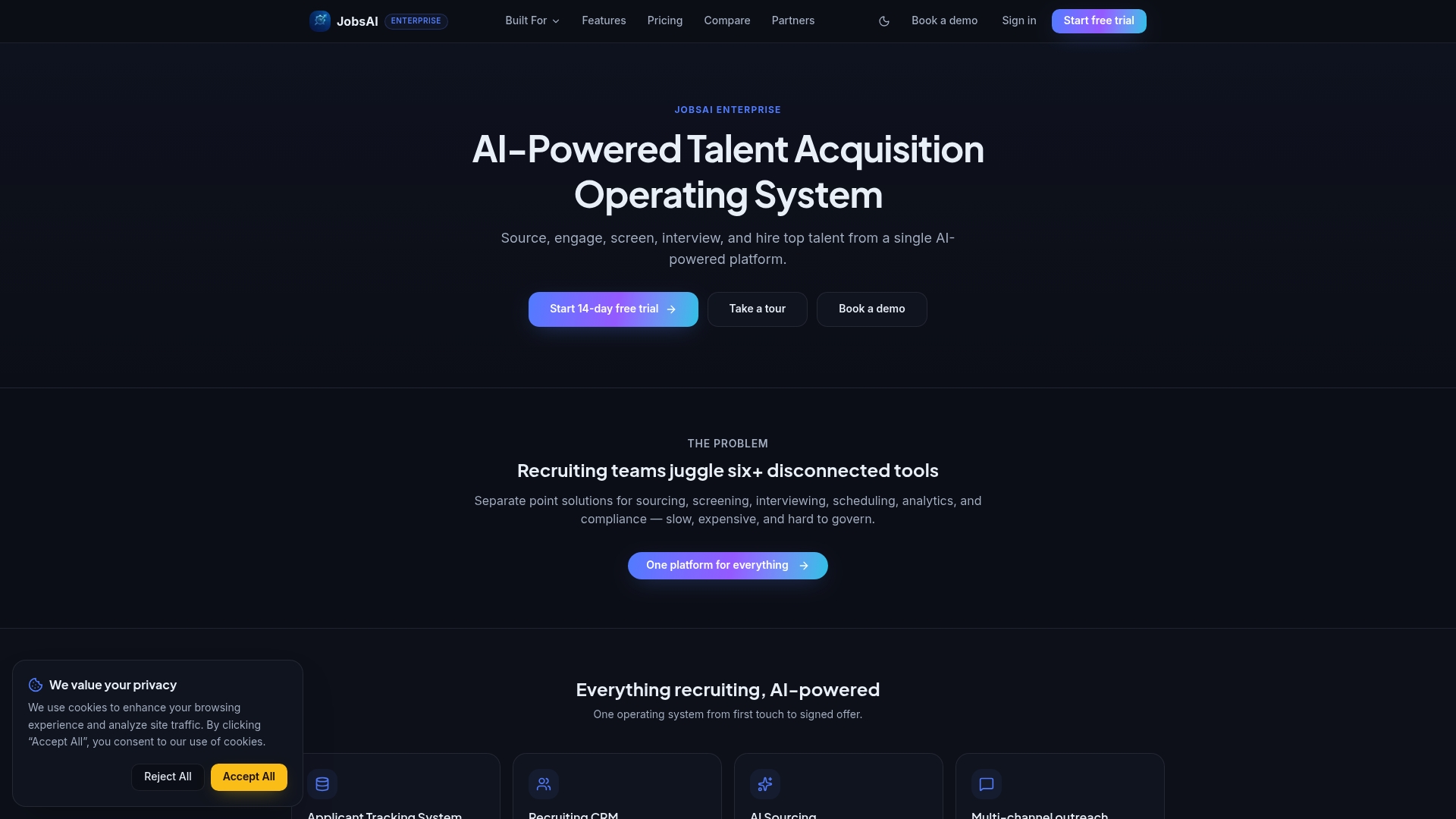
Here’s how it maps to the CRM lifecycle covered in this guide:
- Capture. Career microsites and landing pages collect inbound interest; bulk outreach via email, SMS, and WhatsApp brings passive candidates into the pipeline.
- Engage. Automated drip campaigns with personalization tokens keep candidates warm between active reqs, without manual effort per send.
- Convert. AI screening and candidate ranking surface the best-fit records from your talent pool the moment a req opens, cutting sourcing time significantly.
- Measure. Built-in analytics and executive dashboards track engagement rates, conversion by segment, and cost-per-hire by source in one view.
The recruiting CRM guide shows how the platform’s CRM workflows connect to the lifecycle stages above. To see which plan fits your team’s size and hiring volume, the pricing page breaks down options clearly. If you want to see it in action first, the product tour is a low-friction next step.
Sources
- Candidate Relationship Management (CRM) Software - Gartner
- What is Candidate Relationship Management? Definition & Meaning | SocialTalent Glossary
- How AI Is Turbocharging Candidate Relationship Management …
- What Is Candidate Relationship Management? Definition, Process …
- What is candidate relationship management? (Plus benefits) | Indeed.com UK
FAQ
What is candidate relationship management in recruiting?
Candidate relationship management is the practice of building ongoing relationships with potential hires before, during, and after active hiring processes. It uses segmentation, nurture campaigns, and engagement tracking to keep qualified candidates warm until the right role opens.
What does CRM mean in a recruiting context?
In recruiting, CRM stands for candidate relationship management. It refers to both the strategy of treating candidates as long-term relationships and the software platforms that automate that process through talent pools, campaign tools, and analytics.
What is the difference between an ATS and a candidate CRM?
An ATS manages active applications, interview workflows, and compliance records. A candidate CRM manages relationships with passive candidates, past applicants, and sourced contacts who are not yet in an active process. Mature TA operations use both, integrated bi-directionally.
What is the meaning of candidate management?
Candidate management covers the full process of organizing, communicating with, and tracking candidates across the hiring lifecycle. Candidate relationship management extends this by adding proactive nurture and long-term engagement, not just reactive processing of applicants.
Can a small recruiting team benefit from CRM?
Yes. Even teams hiring fewer than 200 roles per year benefit from a structured talent pool and basic drip campaigns. Many ATS platforms include entry-level CRM features that are sufficient for smaller programs before a dedicated CRM becomes necessary.
Recommended
See it in your workflow
JobsAI Enterprise runs sourcing, AI screening, and the whole interview pipeline in one place. Book a walkthrough tailored to your team.
Book a demo