
Article
30–90 Day Plan for Recruiters: Make Recruiting Tech Stack Agentic Ready

30–90 Day Plan for Recruiters: Make Recruiting Tech Stack Agentic Ready
Every recruiting tech stack needs eight functional pieces working together: an ATS paired with a recruiting CRM, sourcing and talent intelligence, candidate engagement and texting, interviewing, assessments, onboarding, analytics, and the integrations that connect them. Before you buy or cut anything, run a one-week audit to see what recruiters actually use versus what sits idle. Integration health and clean data, not the number of tools you own, determine how much value AI features will actually deliver.
TL;DR:
- Conduct a one-week audit by talking to recruiters and tracking their tool usage to identify shadow IT and manual data handoffs.
- Prioritize fixing integration issues and duplicate candidate records before expanding into AI automation or sourcing improvements.
- Ensure your ATS and CRM have open APIs, event-based syncs, and standardized data formats to maintain a reliable, single candidate record.
- Pilot AI screening on one job family with human review first, then expand to full rollout over 180 days, measuring time-to-hire improvements.
- Budget varies by size; small firms may spend a few thousand dollars monthly, while larger organizations add more tools like VMS and BI, scaling costs accordingly.
Table of Contents
- What Are the Core Components of a Recruiting Tech Stack?
- How Do You Audit Your Recruiting Tech Stack?
- How Do You Prioritize Fixes and Build a 90 to 180 Day Roadmap?
- What Does Good Integration and Data Flow Look Like?
- What Does Agentic AI Mean for Your Stack?
- What Should You Budget for a Modern Recruiting Stack?
- What Does a 30 to 90 Day Implementation Timeline Look Like?
- Lessons From the Field
- Where JobsAI Enterprise Fits in Your Stack
- Sources
- FAQ
What Are the Core Components of a Recruiting Tech Stack?
A staffing agency and a corporate talent acquisition team don’t need the same stack, but they need the same categories covered. Small firms typically run lean, with just an ATS, background checks, and job boards, while larger organizations add matching engines, vendor management systems, pay/bill software, and business intelligence layers as headcount and requisition volume grow, according to ASA’s staffing tech use survey.
Here’s what each category must deliver, and the one number to watch for signs of trouble:
- ATS + recruiting CRM: the system of record for every candidate and client interaction. Watch time-to-first-response; if it creeps past a day, your record is fragmented.
- Sourcing and talent intelligence: finds and ranks candidates before a recruiter touches them. Watch source-to-submit ratio.
- Engagement and texting: keeps candidates warm between stages. Watch response rate within a short timeframe.
- Interviewing: schedules and, increasingly, screens via AI voice or avatar tools. Watch no-show rate, monitoring for indications of issues.
- Assessments: validates skills claims before a client sees a resume. Watch for consistent pass rates across recruiters.
- Onboarding: converts an accepted offer into a start date without paperwork chaos. Watch the number of days to start new hires.
- Analytics: turns activity into decisions. Watch how long it takes to generate reports.
- Integrations/automation: the connective tissue. Watch the frequency of manual data re-entry incidents.
Staffing agencies tend to weight sourcing and engagement heavier because volume is the business. Corporate teams usually weight analytics and compliance heavier because a single bad hire carries more downside per role.
How Do You Audit Your Recruiting Tech Stack?
Most audits fail because they start with a spreadsheet of vendor contracts instead of watching how recruiters actually work. Newbury Partners’ research on year-end tech audits found that a structured review consistently surfaces shadow IT: browser extensions, personal spreadsheets, and unofficial tools recruiters built because the official system didn’t do the job.
Run this diagnostic before your next planning cycle:
- Interview five recruiters and list every tool, extension, or spreadsheet they use in a typical week, including anything not on the approved vendor list.
- Walk one full requisition from intake to placement, and count every manual handoff and every place data gets copied by hand.
- Ask recruiters to estimate hours lost weekly to duplicate data entry or waiting on a report.
- Document friction points with specifics: which system, which step, how many minutes lost, how often it happens.
Pro Tip: Ask recruiters “what do you actually open first each morning?” The honest answer usually isn’t the ATS. That’s your shadow IT map, right there.
How Do You Prioritize Fixes and Build a 90 to 180 Day Roadmap?
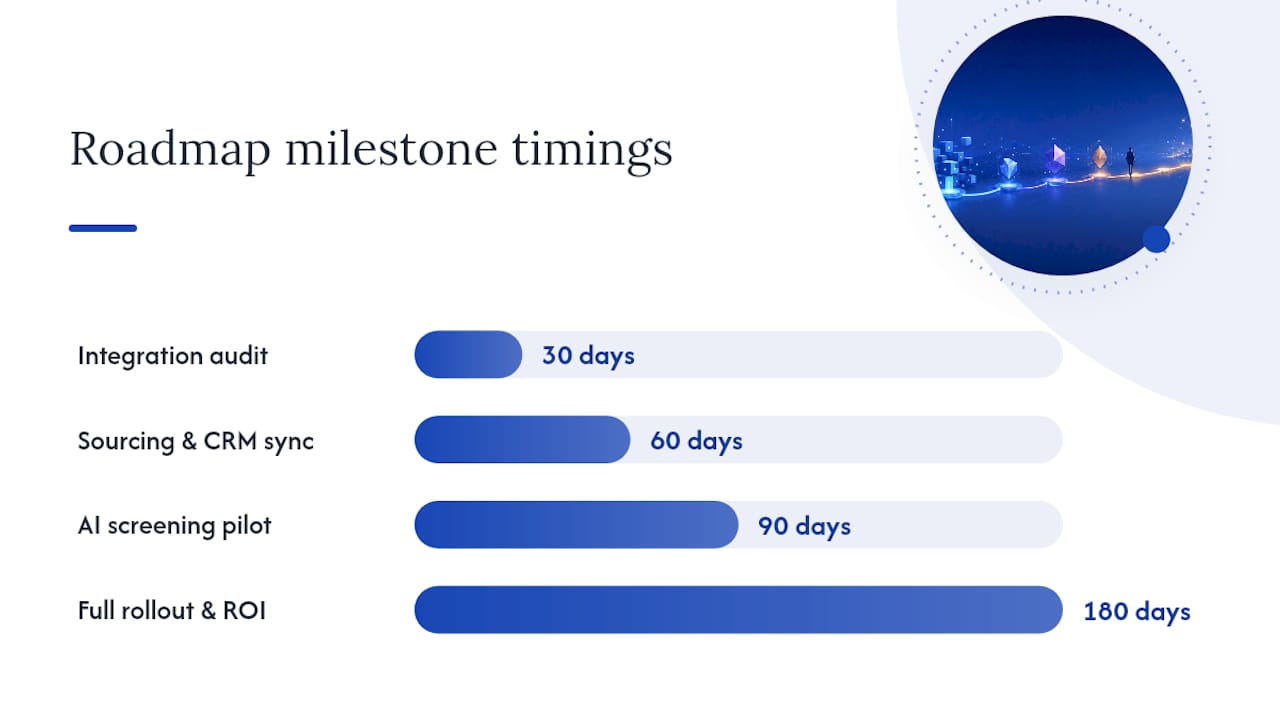
Fix the truth layer first. Integration failures and duplicate candidate records make every downstream tool, including AI, less reliable. Sourcing and engagement gaps come second, since they affect pipeline volume. AI enablement comes last, because feeding AI dirty data just automates the mess faster.
A phased rollout beats a big-bang rewrite. Practitioner deployment playbooks recommend provisioning sourcing seats and engagement flows early, then tackling back-office systems once the front end is stable, per PulseRevOps’s staffing tech stack guidance.
-
30 days: integration audit complete, duplicate candidate records merged, one engagement flow live.
-
60 days: sourcing and CRM fully synced, two more engagement flows running, analytics dashboard rebuilt on clean data.
-
90 days: AI screening piloted on one job family with human review on every decision.
-
180 days: full rollout, back-office and onboarding automation added, ROI measured against baseline.
What Does Good Integration and Data Flow Look Like?
A fused ATS and recruiting CRM works because it keeps one canonical candidate record instead of five partial ones. In staffing, the same person is often a candidate today and a client contact tomorrow, so losing context between systems costs real placements, not just tidiness.
Check your integration health against this list:
- Open APIs on every core system, not just export buttons.
- Event-based syncs (a status change fires an update everywhere) instead of nightly batch jobs.
- Standardized field names and formats across sourcing, ATS, and analytics tools.
- Retry logic and audit logs so a failed sync gets caught, not silently lost.
A red flag worth acting on immediately: if two systems disagree about a candidate’s stage, your truth layer has already broken.
What Does Agentic AI Mean for Your Stack?
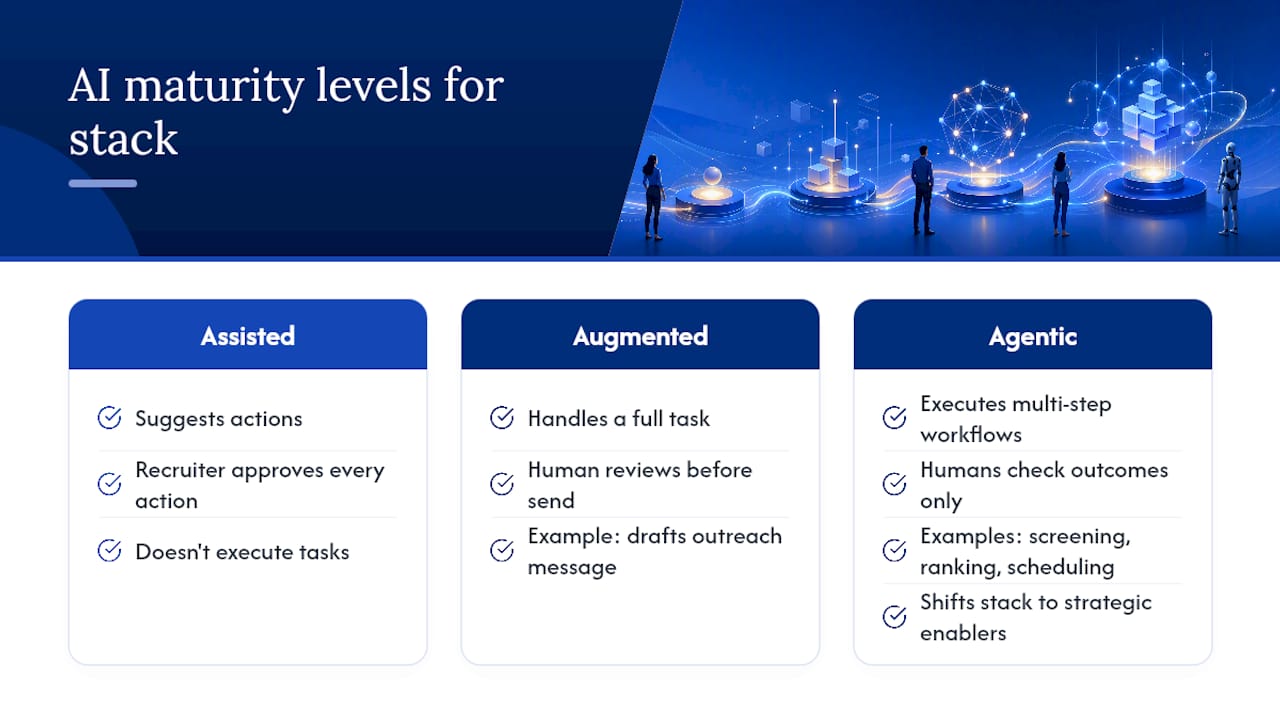
AI-assisted tools suggest actions a recruiter approves. AI-augmented tools handle a full task, like drafting an outreach message, with a human reviewing before it sends. Agentic AI goes further: it can execute multi-step workflows, like screening, ranking, and scheduling, with humans checking outcomes rather than every step. Deloitte’s analysis of the TA tech stack frames this as a shift from static record systems toward strategic enablers that handle volume so people can focus on judgment calls.
Before turning on agentic features, verify that matching, screening, interview intelligence, and outreach automation all pull from the same clean, current candidate data. Garbage-in problems get worse, not better, at agentic speed.
Agentic AI can offload the repetitive intake and screening work, freeing recruiters for relationship-building and the judgment calls a machine still shouldn’t make alone.
Pro Tip: Keep a human checkpoint on every AI ranking decision for at least 90 days. That window is enough to catch bias patterns before they become habits baked into your pipeline.
What Should You Budget for a Modern Recruiting Stack?
Pricing shapes vary by category and can include per seat or per search fees, with integrations sometimes carrying additional costs. For contracting and pay-bill operations, back-office integration depth into general ledger and payroll systems tends to dominate total cost more than any single front-end tool.
A boutique agency might run lean on a few thousand dollars monthly across core categories; a mid-market firm layers on matching and BI tools; enterprise staffing operations add VMS and compliance systems that push spend considerably higher, a pattern ASA’s tech survey confirms scales directly with company size. A quick ROI check: multiply hours saved weekly by your average recruiter’s hourly cost, then add any measurable lift in placements per recruiter.
What Does a 30 to 90 Day Implementation Timeline Look Like?
You don’t need a year to see results. You need clear owners and a short list of moves that reduce friction without stopping active hiring.
- Days 0 to 30: the TA lead and IT complete the audit, merge duplicate records, and launch one engagement flow, like new-applicant acknowledgment texts. Success metric: response rate within 24 hours.
- Days 31 to 60: the vendor and TA lead add two more flows, pre-assignment outreach and post-placement referral requests, both recommended as high-impact, low-effort automations in PulseRevOps’s deployment guidance. Success metric: fewer manual re-entry incidents per week.
- Days 61 to 90: operations and IT pilot AI screening on one job family with human review on every output. Success metric: time-to-shortlist compared to baseline.
Lessons From the Field
The single most useful question in any stack review isn’t “what did we buy?” It’s “what do you actually open first?” Recruiters will tell you, and the answer usually exposes a spreadsheet or extension nobody approved. One quick win worth trying: automating just the new-applicant acknowledgment text. It’s small, but it moves response rates fast enough that recruiters notice within the first week. Run small experiments, measure them honestly, and let the data argue for the next investment.
— Hippolyte A.
Where JobsAI Enterprise Fits in Your Stack
JobsAI Enterprise is built around the same truth layer this guide keeps pointing to: one unified candidate record instead of five disconnected ones. It combines AI screening and ranking, a recruiting CRM and ATS in one workspace, workflow automation for outreach and scheduling, and the integrations needed to keep candidate data consistent across your stack. That combination matters most in the early phase of any roadmap, when duplicate records and manual handoffs are exactly what block reliable AI screening.
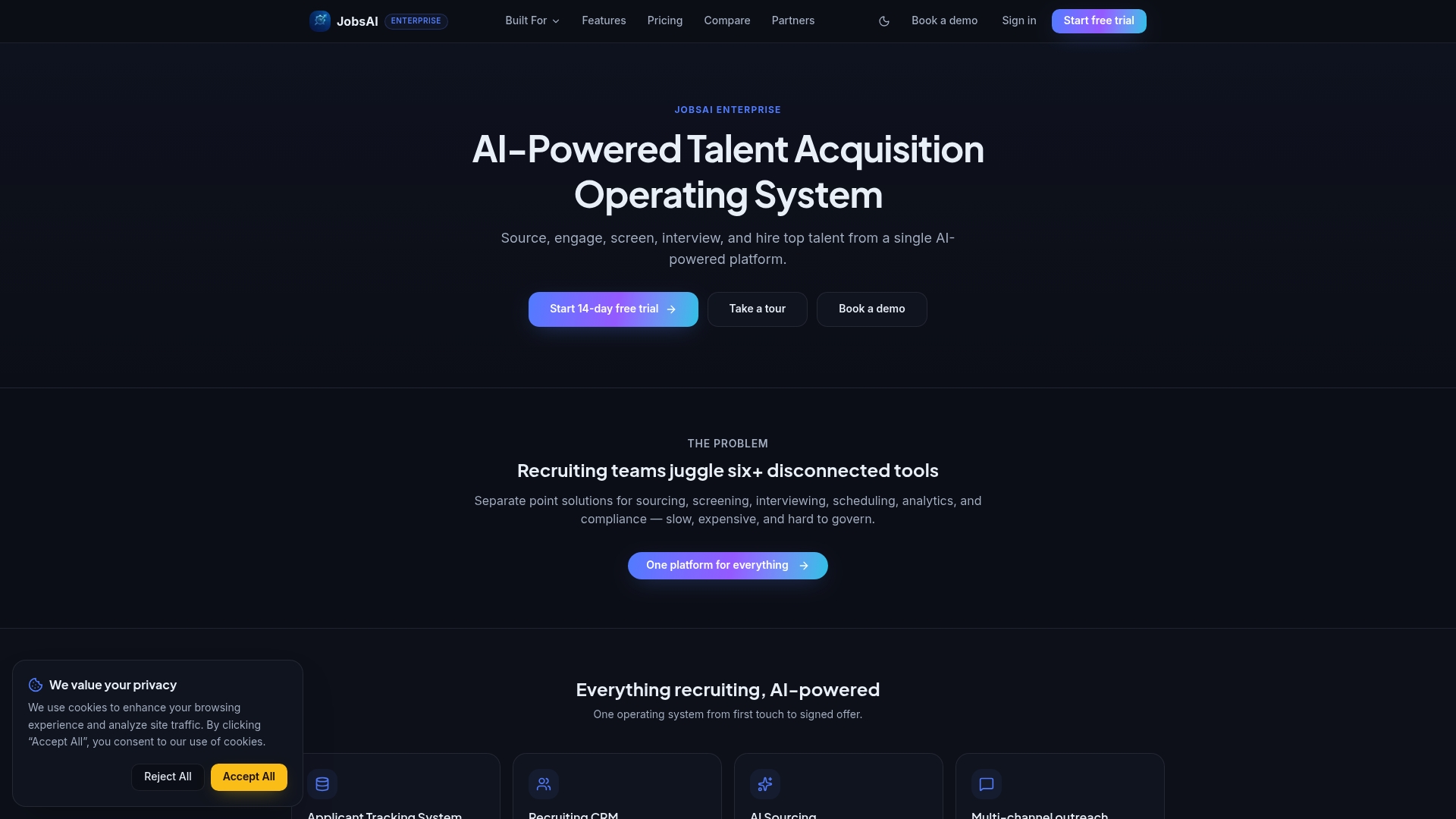
Rather than take that on faith, test it against your own workflows. Run two demo scenarios that mirror your busiest requisition types and see how the candidate record holds up across screening and scheduling. If it fits, the pricing page breaks down plans by team size, and staffing firms specifically can see how the platform maps to agency workflows on the staffing firms page.
Sources
Deloitte’s agentic AI analysis covers AI maturity tiers. Newbury Partners’ audit framework covers shadow IT diagnostics. ASA’s tech survey covers adoption by firm size. PulseRevOps’s deployment guide covers phased rollouts. For AI productivity benchmarks in agency settings, see this analysis of AI adoption ROI.
- From agentic AI to the evolution of the talent acquisition (TA) tech stack
- Future-Proof Your Staffing Tech Stack Planning
- What is the best tech stack for a staffing… in 2027?
FAQ
What Is an HR Tech Stack?
An HR tech stack is the full set of software tools an organization uses to manage the employee lifecycle, from sourcing and hiring through onboarding, payroll, and analytics. A recruiting tech stack is the hiring-focused subset: ATS, CRM, sourcing, engagement, interviewing, and analytics tools working together.
What Are the 5 C’s of Recruitment?
Definitions vary across sources, but a common version covers candidate experience, culture fit, communication, consistency, and compliance. Treat it as a helpful checklist rather than a fixed standard.
What Are the Top ATS Systems to Consider?
Rather than naming five fixed winners, evaluate any ATS against integration depth, scalability for your headcount, and how well it unifies candidate data with your CRM. Platforms like JobsAI Enterprise combine ATS and CRM functions specifically to avoid the fragmentation that ranking lists tend to gloss over.
What Is the 70/30 Rule in Hiring?
It’s a useful directional guide, not a strict formula every team should hit exactly.
How Often Should You Audit Your Recruiting Tech Stack?
Run a full audit at least once a year, ideally at year-end, with a lighter check-in each quarter to catch new shadow IT or integration failures before they compound.
Recommended
See it in your workflow
JobsAI Enterprise runs sourcing, AI screening, and the whole interview pipeline in one place. Book a walkthrough tailored to your team.
Book a demo