
Article
Candidate Management Software for Recruiters: 2026 Guide

Candidate Management Software for Recruiters: 2026 Guide
Candidate management software is a recruiting CRM that centralizes talent pools, nurtures passive candidates, and connects engagement history to your hiring workflows so you can fill roles faster and at lower cost. If your team is sourcing at high volume, sitting on a database of silver medallists you never re-engage, or running employer brand campaigns with no way to track pipeline impact, this is the class of software you need.
Three signals that your team is ready for it:
- You’re sourcing the same candidates repeatedly because previous engagement history lives in spreadsheets or email threads.
- You have strong applicants who weren’t hired for one role but would be right for the next one, and no system to reach them proactively.
- You’re running career-site or event campaigns but can’t connect that activity to actual hires.
Gartner frames candidate relationship management as a distinct category from transactional ATS workflows, emphasizing talent-pool building and marketing-style nurture mechanics. Aptitude Research positions it even more directly: CRM is a foundational operating model, not an optional add-on. Platforms like Jobsai Enterprise are built around exactly this premise.
Table of Contents
- What is candidate management software, exactly?
- How does candidate management software differ from an ATS?
- What features should you expect in a recruiting CRM?
- What outcomes can you realistically expect?
- How do you evaluate and select the right platform?
- How do you connect candidate management to your existing tech stack?
- Which teams benefit most from candidate management software?
- How Jobsai Enterprise addresses candidate management
- Key Takeaways
- A recruiter’s perspective on candidate management
- Jobsai Enterprise is worth a closer look before you commit to a vendor
- Further reading and authoritative sources
- FAQ
What is candidate management software, exactly?
Candidate management software, also called a recruiting CRM or candidate relationship management platform, is software that helps recruiting teams build, segment, and maintain relationships with candidates before and between active job openings. SocialTalent defines the core CRM functions as candidate capture and segmentation, nurture campaigns, re-engagement workflows, and pipeline analytics.
The terminology can be confusing because vendors use several overlapping labels:
- Candidate management software — the broadest term, covering any system that organizes and tracks candidates across the hiring lifecycle.
- Recruiting CRM — emphasizes the relationship-building layer, borrowed from sales CRM logic. Focuses on pipeline building, outreach cadences, and engagement history.
Where does it sit in the talent acquisition stack? Think of it as the relationship layer. Your ATS handles the transaction: the application, the interview, the offer. Your recruiting CRM handles everything before and around that transaction: who’s in your pipeline, how warm they are, when to reach out, and what to say. The two systems are meant to work together, not replace each other.
How does candidate management software differ from an ATS?
This is the question that trips up most buyers. An ATS and a recruiting CRM solve different problems, and conflating them leads to either overpaying for features you won’t use or under-investing in the layer that actually drives pipeline quality.

SAP defines an ATS as a central database and workflow hub that manages job requisitions, résumé scanning, interview scheduling, feedback collection, background checks, and offer generation. It’s a transactional system: candidates enter when they apply, and the ATS moves them through defined stages until they’re hired or rejected.
A recruiting CRM, by contrast, manages relationships with people who haven’t applied yet, or who applied before and weren’t hired. It’s a proactive system.
| Dimension | ATS | Recruiting CRM |
|---|---|---|
| Primary job | Manage active applicants through a defined workflow | Build and nurture talent pools over time |
| Candidate entry point | Application submitted | Sourced, referred, event attendee, career site visitor |
| Core actions | Stage progression, scheduling, offer letters | Segmentation, campaigns, re-engagement, scoring |
| Data focus | Application status, compliance records | Engagement history, interest signals, talent pool membership |
| Recruiter posture | Reactive (respond to applicants) | Proactive (reach out to pipeline) |
| Integration need | HRIS, background check, e-signature | ATS, sourcing tools, career site, email/SMS |
When to use each:
- ATS only: You have a steady inbound applicant flow, roles are standard, and your sourcing is primarily job board-driven.
- CRM only: You’re building a talent community or running campus/event programs but aren’t yet managing active requisitions in the same system.
- Both, integrated: You’re filling roles at volume, re-engaging past candidates, running nurture campaigns, and need engagement history to inform downstream ATS decisions.
The integration point is where most teams stumble. Aptitude Research notes that CRM and ATS function as interdependent systems with shared profiles and synchronized workflows. When they’re not connected, you get data silos: a candidate who was nurtured for six months in your CRM shows up in the ATS as a cold applicant with no context. Recruiters re-ask questions already answered. Candidates feel like strangers. That’s a process failure, not a technology failure, but the right integration prevents it.
What features should you expect in a recruiting CRM?
A well-built candidate management platform covers the full relationship lifecycle, from first contact to hire. Here’s what to look for, and why each feature matters operationally:
- Segmentation: Filter candidates by skills, location, engagement level, past role, or custom tags. Without segmentation, your database is just a list. With it, you can send the right message to the right people. Jobsai Enterprise’s candidate database and talent pools are built around this segmentation-first model.
Pro Tip: High-volume teams should prioritize bulk actions and workflow automation above almost everything else. Marginal UI improvements don’t scale; the ability to move 500 candidates through a stage update in one click does. Map your bulk-action workflows before you evaluate vendors, and test those specific scenarios in every demo.
What outcomes can you realistically expect?
The business case for candidate management software rests on four levers: faster time-to-fill, lower sourcing costs, better candidate experience, and higher quality of hire.
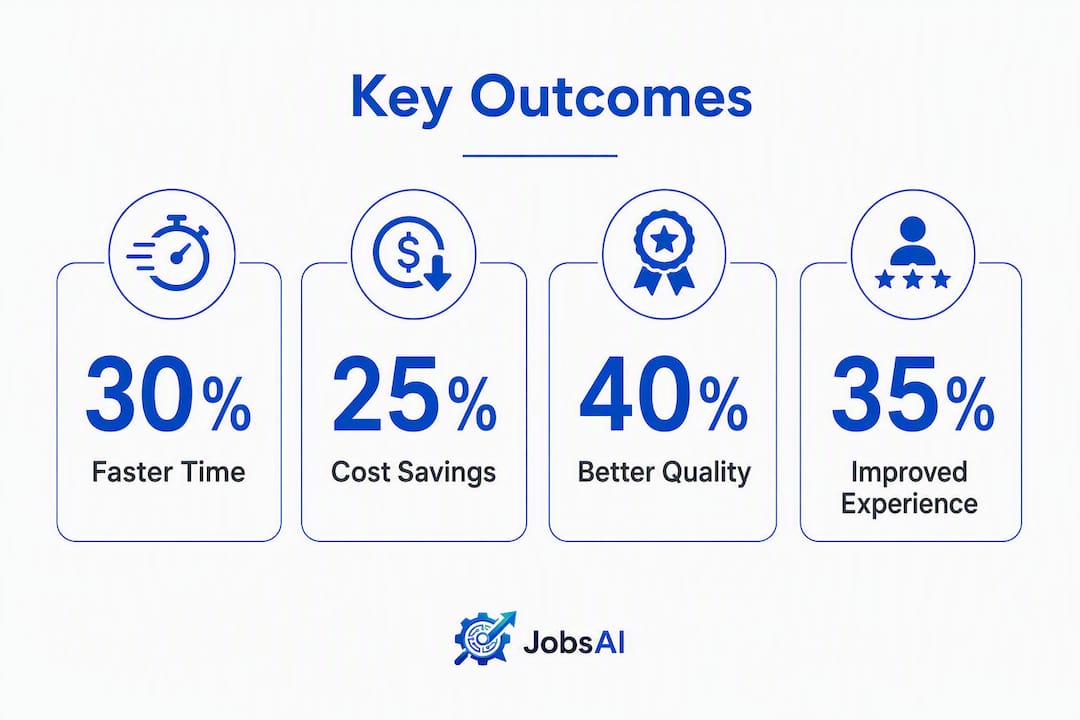
Faster time-to-fill comes from having a warm pipeline ready when a role opens. Instead of posting, waiting, and screening cold applicants, recruiters can reach out to pre-qualified candidates who already know the company. Gartner’s framing of CRM as a marketing-style engagement layer captures this well: personalized candidate journeys and event-driven re-engagement produce stronger pipeline quality than ad hoc outreach managed in spreadsheets.
Lower sourcing costs follow directly. When you re-engage silver medallists or talent community members, you’re not paying job board fees or agency markups for those hires. The more of your pipeline you can fill from existing relationships, the lower your cost-per-hire.
Candidate experience improves when outreach is timely, relevant, and personalized. A candidate who applied six months ago and receives a thoughtful, role-specific message feels valued. One who gets a generic blast or hears nothing at all doesn’t. That distinction shows up in offer acceptance rates and employer brand perception.
Quality of hire tends to improve because nurtured candidates arrive with more context about the role and company. They’ve been engaged, not just recruited.
One honest caveat: feature presence doesn’t guarantee any of these outcomes. Aptitude Research is direct on this point: operational success depends as much on process design, segment ownership, and conversion KPIs as it does on the software itself. Technology amplifies a process. It doesn’t replace governance.
How do you evaluate and select the right platform?
A structured evaluation prevents you from buying on demo impressions rather than operational fit. Work through these dimensions before you talk to vendors:
Capability checklist:
- Does it support talent pool creation, segmentation, and tagging at the depth your team needs?
- Can you run multi-step nurture campaigns across email, SMS, and other channels?
- Does it include AI scoring or talent rediscovery against open requisitions?
- Are bulk actions available for status updates, outreach, and stage moves?
- Does it offer self-scheduling and calendar integration?
- What analytics does it provide natively, and can you export to your BI tools?
Integration checklist: 7. Does it offer bidirectional sync with your ATS, or only one-way data push? 8. Can it connect to your HRIS for employee data and internal mobility? 9. Does it integrate with your sourcing tools (LinkedIn, job boards, career site)?
Security and compliance: 10. Is it SOC 2 compliant? Does it support GDPR and CCPA data handling requirements? 11. Who owns the candidate data if you leave the platform?
Vendor questions to ask in demos:
- What does the ATS integration actually sync, and how often?
- What’s the typical onboarding timeline for a team our size?
- How do you measure customer success, and what KPIs do you track?
- What happens to our data if we cancel?
Pricing and implementation expectations:
| Model | What it means | Typical phases |
|---|---|---|
| Per-seat subscription | Price scales with recruiter headcount | Pilot (2–4 weeks) → rollout (4–8 weeks) → optimization (ongoing) |
| Tiered plans | Base features at lower tiers, AI and automation at higher | Pilot with core team, then expand |
| Modular add-ons | Core platform plus paid modules (AI interview, messaging, white label) | Phased activation as needs grow |
Most teams should budget several weeks from contract to full deployment, assuming clean data migration and a dedicated internal owner. Rushed implementations with no data governance plan are the most common reason CRM adoption stalls.
How do you connect candidate management to your existing tech stack?
Integration is where CRM projects succeed or fail. Aptitude Research positions integration depth as a core decision driver, not a nice-to-have. A CRM that sits in isolation from your ATS is just an expensive email tool.
Integration checklist:
- Bidirectional sync between CRM and ATS so candidate status updates in one system reflect in the other.
- Unified candidate profiles that merge CRM engagement history with ATS application records.
- Campaign data flows that attribute hires back to specific nurture sequences.
- Calendar sync for scheduling so interview availability is always current.
- Sourcing tool connectors (LinkedIn Recruiter, job boards) that import profiles without manual copy-paste.
Implementation steps:
- Pilot with one segment. Choose a single talent pool or business unit. Validate data flows and recruiter adoption before scaling.
- Map your fields. Align CRM profile fields with ATS fields before migration. Mismatched fields create duplicate profiles and data loss.
- Train on process, not just features. Recruiters need to understand the workflow logic (when to tag, when to trigger a campaign, who owns each segment) as much as the UI.
- Assign segment owners. Every talent pool needs a named recruiter responsible for cadence and conversion. Unowned pools go cold.
- Set governance rules. Define data retention policies, consent management for GDPR/CCPA, and profile deduplication standards before go-live.
Common pitfalls:
- One-way sync only: Candidate moves in the ATS don’t update the CRM, so recruiters work from stale data.
- Duplicate profiles: No deduplication logic means the same candidate appears multiple times with conflicting history.
- Unclear ownership: No one assigned to a talent pool means no outreach happens and the investment goes to waste.
Each of these is preventable with upfront process design. The technology can only execute what the process defines.
Which teams benefit most from candidate management software?
Not every team needs a full recruiting CRM on day one. The right entry point depends on hiring volume, role complexity, and how much of your pipeline is currently passive.

| Team type | Hiring cadence | Priority features | When to start |
|---|---|---|---|
| Staffing / agency | High volume, multiple clients | Bulk actions, campaign automation, client portals | Immediately if managing 50+ active candidates |
| Corporate TA (enterprise) | Moderate volume, complex roles | Talent pools, internal mobility, analytics | When sourcing costs exceed budget or time-to-fill is rising |
| Early-career / campus | Seasonal, event-driven | Event capture, drip campaigns, segmentation | Before campus season begins |
| Specialized / executive | Low volume, high-touch | AI scoring, personalized outreach, relationship tracking | When quality-of-hire is the primary KPI |
Staffing firms get the most immediate ROI because they’re managing candidates across multiple clients simultaneously. Bulk actions and workflow automation reduce per-candidate coordination overhead in ways that scale directly with volume.
Corporate TA teams benefit most from the internal mobility and talent rediscovery angle. When a role opens, the first question should be “who in our existing database fits?” not “where do we post?”
Hiring manager enablement is a use case that’s often overlooked. A CRM with a hiring manager workspace lets managers see pipeline status, leave feedback, and approve outreach without needing full recruiter access. That reduces back-and-forth and speeds decision cycles.
When to extend ATS tagging instead of buying a CRM: if you’re filling fewer than 20 roles per year, have no passive sourcing program, and your ATS already supports basic tagging and email templates, a full CRM may be more than you need. Start with structured ATS tagging and a simple email cadence. Graduate to a CRM when that process breaks under volume.
How Jobsai Enterprise addresses candidate management
Jobsai Enterprise is built as an AI-powered talent acquisition operating system that combines ATS functionality, a recruiting CRM, AI candidate scoring, bulk outreach, and workflow automation within a single workspace. For recruiting agencies, staffing firms, and corporate TA teams, that unified architecture matters because it eliminates the integration overhead that typically slows CRM adoption.
Here’s how the platform maps to the evaluation criteria covered earlier:
- Candidate database and talent pools: Jobsai Enterprise centralizes candidate profiles with full engagement history, pool membership, and segmentation. Recruiters can search, filter, and act on pools without switching systems. The candidate database and talent pools guide walks through the setup in detail.
- AI screening and scoring: The platform’s AI candidate scoring automatically ranks applicants against job requirements, surfacing the strongest matches first. This reduces manual review time and keeps high-volume pipelines moving.
- Workflow automation — Automated stage moves, reminders, and follow-up sequences reduce the coordination overhead that typically consumes recruiter time at scale.
Jobsai Enterprise also offers client portals with white labeling for staffing firms, offer letter generation with e-signature, and compliance management, covering the full hiring lifecycle rather than just the CRM layer.
Pro Tip: If you’re evaluating Jobsai Enterprise for a staffing firm, start with the staffing firms page to see how the platform handles multi-client candidate management. The bulk outreach and client portal features are particularly relevant for agencies managing candidates across multiple job orders simultaneously.
Key Takeaways
The most effective candidate management approach combines a recruiting CRM for pipeline building with a tightly integrated ATS for transactional workflows, governed by clear segment ownership and measurable conversion KPIs.
| Point | Details |
|---|---|
| CRM vs. ATS distinction | A recruiting CRM builds and nurtures talent pools; an ATS manages active applicants through defined stages. Both are needed. |
| Integration is non-negotiable | Bidirectional sync between CRM and ATS prevents data silos and ensures engagement history informs hiring decisions. |
| Process before technology | Segment owners, nurture cadences, and conversion KPIs must be defined before go-live or adoption will stall. |
| High-volume teams prioritize bulk actions | Bulk outreach, automated stage moves, and self-scheduling deliver the largest time savings at scale. |
| Jobsai Enterprise | Combines recruiting CRM, AI scoring, bulk outreach, and ATS orchestration in one workspace, reducing integration overhead for staffing firms and TA teams. |
A recruiter’s perspective on candidate management
The biggest shift candidate management software creates isn’t in the technology. It’s in how recruiters spend their time. Before a CRM, most of the day goes to reactive work: screening inbound applications, chasing interview feedback, re-sourcing roles that were filled six months ago. After a CRM, the work becomes more proactive. You’re reaching out to warm candidates before a role is even posted. You’re running a nurture sequence for a talent pool you built last quarter. You’re measuring which campaigns actually convert to hires.
That shift doesn’t happen automatically. The teams that get the most from candidate management software are the ones that standardize their tags from day one, assign a named owner to every talent pool, and set a cadence for reviewing pipeline health weekly rather than when a role becomes urgent. Tracking candidate engagement at the campaign level, not just the individual level, is what tells you whether your nurture strategy is working or just generating opens.
One honest caution: governance and training are where most CRM rollouts underinvest. A platform with 50 features and no adoption plan produces the same outcome as a spreadsheet. Assign a CRM owner, run a structured onboarding for every recruiter, and review conversion metrics monthly. That discipline is what separates teams that fill roles faster from teams that paid for software they don’t fully use.
Jobsai Enterprise is worth a closer look before you commit to a vendor
Most recruiting teams evaluating candidate management software spend weeks comparing feature lists and sitting through demos before realizing the real question is whether the platform will actually get used. Jobsai Enterprise is built to close that gap: fast onboarding, AI scoring that works out of the box, and a unified workspace that doesn’t require a separate ATS integration project to get started.
Three reasons TA teams and staffing firms choose it:
- Fast onboarding: The platform is designed for teams that need to be operational quickly, not after a six-month implementation.
- AI scoring built in: Candidate ranking and screening run automatically, so recruiters spend time on decisions, not manual review.
- Unified workflows: CRM, ATS, outreach, scheduling, and analytics live in one place, which means no data silos and no context switching.
See the full pricing and plan options or take the product tour to see how it fits your team’s workflow.
Further reading and authoritative sources
These resources are worth consulting as you move from evaluation to procurement:
- Gartner Candidate Relationship Management Software Reviews: Gartner’s market framing for CRM, including buyer expectations and category definitions. Useful for benchmarking vendor claims.
- Aptitude Research CRM Index Report: The most detailed analyst framework for evaluating CRM as an operating model, covering integration strategy, modular capabilities, and AI intelligence layers.
- SocialTalent: What is Candidate Relationship Management?: A practitioner-friendly glossary entry that explains CRM mechanics and how they complement ATS workflows.
- SAP: What is an Applicant Tracking System?: Clear ATS definition covering pipeline workflow, applicant experience, and emerging AI capabilities. Good reference for the ATS side of the CRM/ATS comparison.
- Aptitude Research: Scheduling and TA Tech Challenges: Research on CRM/ATS interdependence and the operational cost of disconnected systems.
- G2: Best Candidate Relationship Management Software: Peer review aggregator with verified user ratings across CRM platforms. Useful for social proof and feature comparison at scale.
- Jobsai Enterprise: Recruiting CRM Guide: Practical guide to Jobsai Enterprise’s CRM module, including setup, integration points, and workflow examples.
- Jobsai Enterprise: AI Candidate Scoring Guide: Explains how AI scoring and ranking work within the platform, with guidance on configuring match criteria.
FAQ
What is the difference between an ATS and a CRM in recruiting?
An ATS manages active applicants through defined hiring stages, from application to offer. A recruiting CRM builds and nurtures relationships with passive candidates and talent pools before and between active requisitions. Most high-volume teams need both, integrated so engagement history flows between them.
What is the best CRM for hiring teams?
The right choice depends on team size, hiring volume, and integration requirements. Jobsai Enterprise combines recruiting CRM, AI scoring, bulk outreach, and ATS orchestration in a single platform, making it a strong fit for staffing firms and corporate TA teams managing high-volume pipelines.
Is Workday an ATS or a CRM?
Workday is primarily an HRIS and ATS. It manages active applicants, requisitions, and HR records. It includes some CRM-adjacent features, but dedicated recruiting CRM platforms offer deeper talent pool management, campaign automation, and engagement analytics than Workday’s native recruiting module.
What are the top ATS systems used in the US?
The most widely referenced ATS platforms in the US market include Workday Recruiting, Greenhouse, Lever, iCIMS, and Taleo. Jobsai Enterprise offers a combined ATS and recruiting CRM within one workspace, which reduces the need for a separate CRM integration.
How long does it take to implement candidate management software?
Most teams should plan for 6–10 weeks from contract to full deployment, covering data migration, field mapping, integration setup, and recruiter training. Rushed implementations without a named internal owner and clear data governance are the most common cause of stalled adoption.
Recommended
See it in your workflow
JobsAI Enterprise runs sourcing, AI screening, and the whole interview pipeline in one place. Book a walkthrough tailored to your team.
Book a demo