
Article
Social Insurance Number Verification: HR Guide for U.S. Employers

Social Insurance Number Verification: HR Guide for U.S. Employers
Social insurance number verification is the process of confirming that an employee’s national identifier, whether a U.S. Social Security Number (SSN) or a Canadian Social Insurance Number (SIN), matches government records and supports employment eligibility, accurate payroll reporting, and fraud prevention. If you are onboarding a new hire right now, here are three things to do immediately:
- Collect the employee’s SSN on Form I-9 and confirm the number is nine digits with no obvious formatting errors.
- Run a government check through the SSA’s SSNVS or submit to E-Verify if your organization is required or chooses to participate.
- Record the verification result securely in your HR system and retain the documentation per I-9 retention rules.
The step-by-step workflow for each of these actions, plus what to do when a check fails, is covered in the practical checklist section below.
Key Takeaways
Social insurance number verification, in U.S. practice, means confirming that an employee’s SSN matches SSA records and supports employment eligibility, payroll accuracy, and fraud prevention before the first payroll run.
| Point | Details |
|---|---|
| SSN vs. SIN format | SIN uses a Luhn check digit for format validation; SSN has no check-digit, so format checks alone are not a reliable screen. |
| Primary government tools | SSA SSNVS confirms name-SSN match for payroll; E-Verify confirms employment eligibility; both are free for employers. |
| When to add a vendor | Use commercial vendors (Equifax, Experian, LexisNexis, Socure, ID.me) for remote hires, high-risk roles, or when government tools return a mismatch. |
| Recordkeeping rules | Retain I-9 forms for three years from hire or one year after separation, whichever is later; E-Verify case records for three years from hire. |
| Jobsai Enterprise | Centralizes candidate records, automates verification workflow triggers, and maintains audit logs for corporate HR teams managing high-volume hiring. |
Table of Contents
- What social insurance number verification means: SIN vs. SSN
- Why HR teams verify national identifiers
- How to verify an employee’s SSN: the main methods
- What to do when verification fails
- Privacy, consent, and recordkeeping for verification
- A practical HR checklist for SSN verification
- How automation reduces manual verification work
- The trade-offs HR teams rarely talk about
- Jobsai Enterprise fits naturally into your verification workflow
- Sources
- FAQ
What social insurance number verification means: SIN vs. SSN
A Social Insurance Number (SIN) is a unique 9-digit administrative number issued by the Canadian government to identify individuals for tax, employment insurance, and government program purposes. Canada’s SIN Code of Practice makes clear that the SIN is not an identity document. Canada stopped issuing plastic SIN cards in 2014; holders now receive a confirmation letter instead. For HR teams, that distinction matters: you cannot ask a Canadian employee to produce a physical SIN card as proof of identity, because none exist.
A Social Security Number (SSN) is the U.S. equivalent: a 9-digit number issued by the Social Security Administration (SSA) to U.S. citizens, permanent residents, and eligible temporary workers. Both numbers serve the same administrative purpose, but they differ in one technically important way.
SIN uses a Luhn-style check digit. That means a basic format check can catch obvious typos before you even contact a government agency. SSN has no universal check-digit algorithm, so a nine-digit number that looks correct may still be wrong. Format validation is a useful first filter for SINs; for SSNs, it is not a reliable screen at all.
Two quick comparisons worth keeping in mind:
- Government issuer: SIN is issued by Service Canada; SSN is issued by the SSA.
- Acceptable proof employers see: For SINs, a confirmation letter or My Service Canada Account printout; for SSNs, a Social Security card, though the card alone is not sufficient for I-9 purposes without a supporting identity document.
Employers who need to confirm a Canadian employee’s SIN can contact Service Canada directly and must provide their CRA business number to authenticate the request.
Why HR teams verify national identifiers
Verification is not optional for most U.S. employers. Federal law requires completion of Form I-9 for every new hire, which includes collecting and reviewing documents that establish identity and work authorization. E-Verify, operated by DHS/USCIS, extends that obligation for federal contractors and employers in states with mandatory participation laws.
Beyond legal compliance, the business case for verification is straightforward:
- Payroll and tax accuracy: An SSN mismatch means W-2s go to the wrong record, triggering IRS penalties and employee tax headaches.
- Benefits eligibility: Health plan enrollment and retirement contributions are tied to the correct SSN; errors create downstream administrative problems that are expensive to unwind.
- Fraud prevention: Synthetic identity fraud, where someone constructs a plausible but fictitious identity, is a real hiring risk. Verification catches mismatches before they become payroll liabilities.
- Audit readiness: The Department of Labor and IRS both audit employer records. A clean, documented verification trail is your first line of defense.
The EEOC adds an important constraint: verification practices must be applied consistently across all candidates. Selectively verifying only certain groups based on national origin, name, or perceived immigration status is discriminatory and exposes the organization to liability. Apply the same process to every new hire, every time.
How to verify an employee’s SSN: the main methods
HR teams have three practical options, and the right choice depends on the hiring scenario, volume, and risk level.
Government tools
SSA SSN Verification Service (SSNVS) lets registered employers verify whether a name and SSN combination matches SSA records. It is free, operated by the SSA, and designed specifically for payroll and tax reporting purposes. Turnaround is typically instant for online submissions, though bulk file submissions may take up to one business day. SSNVS confirms a name-SSN match; it does not verify work authorization.
E-Verify, operated by DHS/USCIS, goes further. It checks both SSA records and DHS immigration databases to confirm employment eligibility. Results come back within seconds for most cases. E-Verify is free for employers and mandatory for federal contractors and in several states. It does not replace the I-9 process; it supplements it.
Manual document checks (I-9 process)
The I-9 process requires the employee to present acceptable documents from List A (identity and work authorization combined) or Lists B and C (identity and work authorization separately). HR reviews the documents for authenticity and records the information. This is the baseline legal requirement for every U.S. employer.
Commercial identity vendors
Vendors such as Equifax Workforce Solutions, Experian Identity, LexisNexis Risk Solutions, ID.me, and Socure offer SSN-to-name matching, identity proofing, and fraud scoring. These services pull from credit bureau records, public data, and proprietary databases to give a confidence score rather than a simple match/no-match. They are particularly useful for remote onboarding, high-volume hiring, or roles with elevated fraud risk.
Many U.S. financial and identity workflows use the last four digits of an SSN as a quick verification data point, but the last four digits alone are not sufficient for full identity proofing. Treat them as a triage step, not a conclusion.
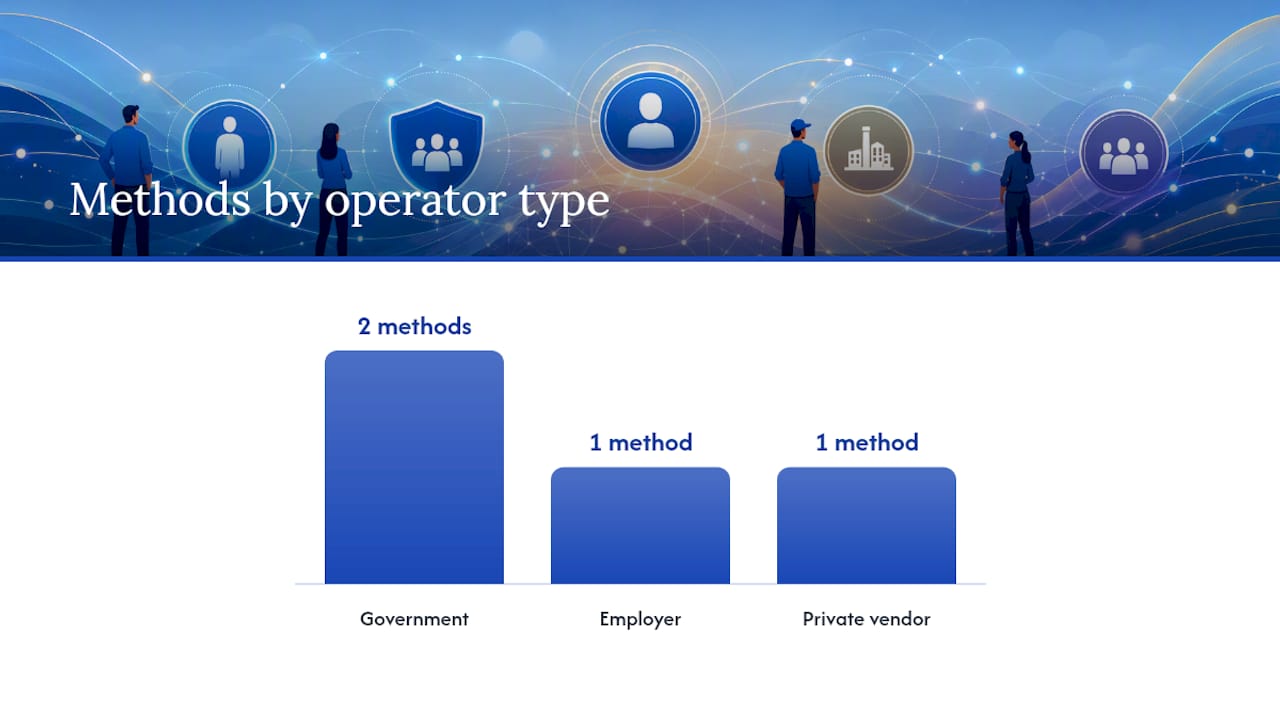
| Method | Purpose | Operator | Speed | Cost | Consent/Recordkeeping |
|---|---|---|---|---|---|
| SSA SSNVS | Name-SSN match for payroll | Government (SSA) | Instant to 1 day | Free | Employee notice; retain results |
| E-Verify | Employment eligibility | Government (DHS/USCIS) | Seconds | Free | Mandatory case records; 3-year retention |
| I-9 manual check | Identity and work authorization | Employer | Same day | Staff time | Retain I-9 per federal rules |
| Commercial vendor (Equifax, Experian, LexisNexis, Socure, ID.me) | Identity proofing, fraud scoring | Private | Seconds to minutes | Per-check pricing | Written consent; vendor contract required |
Pro Tip: For remote hires or high-risk roles, combine an SSNVS or E-Verify check with a commercial identity proofing vendor. Government tools confirm the number exists and matches a name; vendor tools add a fraud-risk layer that government databases do not provide. Together, they produce the strongest compliance posture with the clearest audit trail.
What to do when verification fails
A mismatch does not automatically mean fraud. Common causes include:
- Simple data-entry errors (transposed digits, misspelled name)
- Name changes not yet updated with the SSA (marriage, divorce, legal name change)
- SSN issued under a former name
- Temporary or recently expired immigration documents
- Synthetic identity or deliberate misrepresentation
Work through these steps in order before drawing any conclusions.
- Re-check the entry. Confirm the SSN and name were entered exactly as they appear on the employee’s documents. A single transposed digit is the most common cause of a mismatch.
- Ask the employee to confirm. Request that they review the number they provided and, if needed, present their original Social Security card or a replacement document.
- Use the SSA name/SSN correction process. If the employee’s name has changed and the SSA record has not been updated, direct them to their local SSA office to correct the record before re-running the check.
- Follow the E-Verify Tentative Nonconfirmation (TNC) process. If E-Verify returns a TNC, you must notify the employee in writing, give them the opportunity to contest the result, and allow them to continue working during the referral period. Do not terminate or take adverse action during this window.
- Escalate suspected fraud. If the mismatch persists after the employee has had a reasonable opportunity to correct it, and the pattern suggests deliberate misrepresentation, escalate to your internal security or legal team and, where appropriate, to the relevant government agency.
Throughout this process, document every step. Employee communication should be factual and private; never discuss a TNC or mismatch in front of other employees.
Privacy, consent, and recordkeeping for verification
SSNs are sensitive personal data. Mishandling them creates legal exposure under federal and state privacy laws, and the risk of a breach is real. Canadian guidance reinforces the same principle: employers must not require physical SIN cards as proof and should limit SIN use to necessary administrative purposes only. The same discipline applies to SSNs in U.S. practice.
Retention rules to know:
- I-9 forms: Retain for three years from the date of hire or one year after employment ends, whichever is later.
- E-Verify case records: Retain for three years from the date of hire.
- SSNVS results and vendor reports: Retain per your internal data governance policy; most legal counsel recommends aligning with I-9 retention periods.
Secure storage checklist:
- Encrypt SSN data at rest and in transit.
- Restrict access to HR and payroll personnel with a documented need.
- Maintain an audit log of who accessed verification records and when.
- Store only the minimum data required; redact or mask SSNs in documents where the full number is not necessary.
- For third-party vendor checks, obtain written employee consent before initiating the check and confirm the vendor contract covers data handling, breach notification timelines, and compliance attestations such as SOC 2 Type II or ISO 27001.
Using e-signature tools integrated with your hiring platform to capture consent at the offer stage keeps the consent record tied to the candidate file from day one.
A practical HR checklist for SSN verification
Use this as a template for your onboarding SOP. Assign ownership at each step so nothing falls through the gaps.
- Collect SSN and acceptable I-9 documents at offer acceptance. (Owner: Recruiter) Confirms you have the information needed before day one, reducing delays.
- Perform a format check on the SSN. (Owner: HR Admin or ATS) Catches obvious entry errors before submitting to government systems.
- Complete Form I-9 on or before the first day of work. (Owner: HR Admin) Federal law requires this; late completion creates audit exposure.
- Submit to SSA SSNVS for payroll accuracy. (Owner: Payroll or HR Admin) Confirms the name-SSN combination matches SSA records before the first payroll run.
- Submit to E-Verify if required. (Owner: HR Admin) Must be initiated no later than three business days after the first day of work.
- Apply commercial identity proofing for remote or high-risk hires. (Owner: HR Admin or Security) Adds a fraud-risk layer beyond what government tools provide.
- Record the verification result in your HR system. (Owner: HR Admin) Creates the audit trail required for compliance reviews.
- Follow remediation steps for any mismatch. (Owner: HR Admin, with escalation to Legal/Security as needed) Documented remediation protects the organization if the hire is later audited.
- Retain all verification records per policy. (Owner: HR Admin or Records Manager) I-9 and E-Verify records have federally mandated retention periods.
How automation reduces manual verification work
Manual verification is where time-to-hire is usually lost. Each handoff between recruiter, HR admin, and payroll introduces a delay, and a missed step can mean a payroll error on the first pay cycle or an I-9 that is technically out of compliance.
API-driven screening and workflow automation address this by connecting the steps that HR teams currently handle manually. Common automation patterns include:
- API-driven SSN/name checks: Trigger an SSNVS or vendor identity check automatically when a candidate’s status moves to “offer accepted,” rather than waiting for HR to initiate it manually.
- Automated I-9 document capture: Prompt candidates to upload acceptable documents through a secure portal at the offer stage, so HR receives complete packets rather than chasing attachments.
- Workflow triggers for TNCs and mismatches: Route mismatch cases automatically to the right team member with the correct next-step instructions, rather than relying on someone to notice a flag in an email.
- Archiving verification artifacts: Store SSNVS results, E-Verify case numbers, and vendor reports directly in the candidate record so the audit trail is complete without manual filing.
Jobsai Enterprise supports these patterns through its centralized candidate records and workflow automation capabilities, including API and webhook integrations that connect to third-party identity and verification vendors. For corporate HR teams managing high-volume hiring, centralized audit logs and secure document attachments reduce the risk of a compliance gap at scale.
When evaluating any vendor for verification workflow integration, confirm these before signing:
- SOC 2 Type II or ISO 27001 attestation
- Data residency and retention policies that match your compliance requirements
- API rate limits that support your hiring volume
- Consent capture built into the candidate-facing workflow
- Breach notification timelines and incident response SLAs in the contract
The trade-offs HR teams rarely talk about
Speed and accuracy pull in opposite directions in verification workflows, and most HR teams feel that tension most acutely during high-volume hiring periods.
When you are onboarding 50 people in a week, the temptation is to run a quick format check and move on. The problem is that format checks catch typos, not fraud. A synthetic identity with a correctly formatted SSN sails through a format check and only surfaces when SSNVS or a vendor tool runs a name match. The extra 30 seconds per candidate that a government check takes is almost always worth it.
Privacy is the other trade-off. Commercial identity vendors give you more confidence, but they also mean sharing candidate data with a third party. That requires explicit consent, a solid vendor contract, and a clear data minimization policy. For most roles, SSNVS plus E-Verify is sufficient and keeps data sharing to a minimum. Vendor identity proofing makes sense for remote hires, executive roles, or positions with access to sensitive systems, where the risk justifies the additional data handling.
The candidate experience matters too. A verification process that feels intrusive or poorly explained creates friction at exactly the moment you want a new hire to feel welcomed. A brief, clear communication at the offer stage, explaining what you are checking and why, goes a long way. Most candidates understand that verification is standard practice; they just want to know it is being handled responsibly.
Jobsai Enterprise fits naturally into your verification workflow
Verification compliance does not have to mean more manual work. Jobsai Enterprise is built for corporate HR teams and talent acquisition teams who need to move fast without creating compliance gaps. The platform centralizes candidate records, automates screening steps, and connects to third-party verification vendors through API and webhook integrations, so your SSNVS results, E-Verify case numbers, and I-9 documents live in one auditable place rather than scattered across email threads and shared drives.
Secure document attachments, audit logging, and workflow automation mean your team spends less time chasing paperwork and more time making hiring decisions. If you want to see how it fits your specific onboarding workflow, take the product tour or explore the AI screening guide to understand how automation patterns connect verification steps end to end.
Sources
These are the primary references to bookmark for ongoing compliance work:
- The Social Insurance Number (SIN) Code of Practice
- Why do I need to enter the last 4 digits of my Social Security Number (SSN)?
This article is general information, not a substitute for advice from a qualified lawyer. Consult a qualified legal professional about your own circumstances before acting on anything here.
FAQ
What does Social Security number verification mean?
SSN verification is the process of confirming that a name and Social Security Number combination matches SSA records. Employers use it primarily for payroll accuracy and, through E-Verify, for employment eligibility confirmation.
Are the last four digits of an SSN enough to verify identity?
No. The last four digits are commonly used as a quick triage step in financial and identity workflows, but they are not sufficient for full identity proofing. A complete verification requires a full SSN match through SSNVS or a commercial identity vendor.
How long does SSN verification take?
SSNVS returns results instantly for individual online submissions; bulk file submissions may take up to one business day. E-Verify typically returns a result within seconds. Commercial vendor checks generally complete in seconds to a few minutes.
How do I get verification of my Social Security number as an employer?
Register with the SSA’s SSN Verification Service at ssa.gov/employer/ssnv.htm. You will need your employer identification number (EIN) to enroll. For employment eligibility verification, register separately with E-Verify through the DHS/USCIS portal.
What should HR do if an SSN verification fails?
Start by re-checking the entry for data-entry errors, then ask the employee to confirm their number and present their original Social Security card. If E-Verify returns a Tentative Nonconfirmation, notify the employee in writing and allow them to contest the result before taking any adverse action.
Recommended
See it in your workflow
JobsAI Enterprise runs sourcing, AI screening, and the whole interview pipeline in one place. Book a walkthrough tailored to your team.
Book a demo