
Article
Pilot Recruiting Workflow Automation on Screening for Hiring Teams

Pilot Recruiting Workflow Automation on Screening for Hiring Teams
Recruiting workflow automation is the practice of connecting your hiring stages, screening, scheduling, feedback, offers, so candidates move forward automatically until a recruiter’s judgment is genuinely needed. Done right, it cuts time-to-hire, removes manual handoffs, and gives every candidate a consistent experience. The fastest way to start: map your current funnel and pilot automation on one high-volume stage, usually screening or scheduling, before you touch anything else.
TL;DR:
- Effective recruiting workflow automation requires persistent context, conditional triggers, branching logic, and real-time status propagation across systems.
- Prioritize automating high-volume stages like screening first, using structured resume parsing and explainable scoring to ensure reliable candidate filtering.
- Implement automation in phases, starting with clear KPIs such as reducing time-to-first-interview, and thoroughly test integrations and exception paths before scaling.
- Regularly audit scoring models for bias, maintain full logs, and set human checkpoints for borderline scores to ensure fair and accountable hiring decisions.
- Automation can cut time-to-hire by up to 30%, but success depends on focused pilot projects, proper measurement with control groups, and careful governance.
Table of Contents
- What Is Recruiting Workflow Automation (And How Is It Different From Task Automation)?
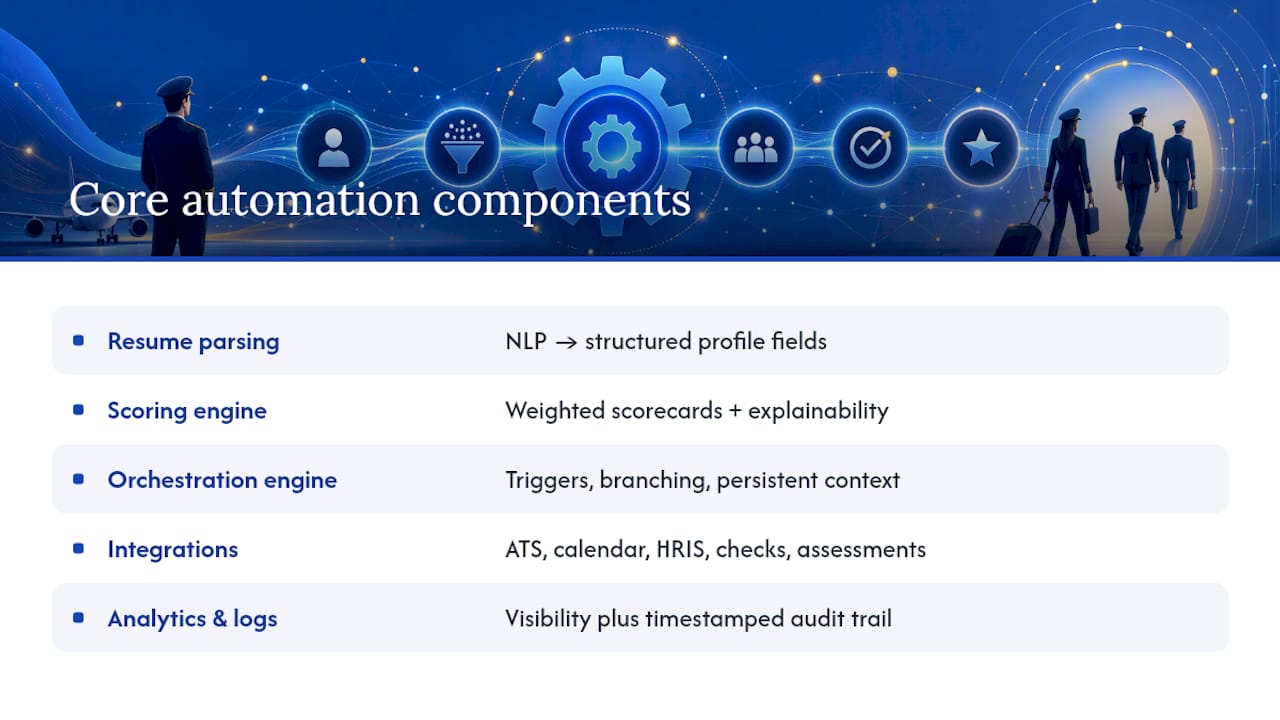
- Core Components And Capabilities To Look For In A Recruiting Workflow Automation Stack
- Practical Automation Workflows You Can Adapt Today
- How To Implement Recruiting Workflow Automation: A Step-By-Step Playbook
- KPIs And Dashboards To Measure Automation’s Real Impact
- Risks And Governance: Keeping Automation Fair And Accountable
- JobsAI Enterprise In Practice: What Teams Actually Gain
- What I’ve Learned Watching Teams Automate Their Hiring
- Getting Started With JobsAI Enterprise
- Sources
- FAQ
What Is Recruiting Workflow Automation (And How Is It Different From Task Automation)?
Most teams already automate individual tasks. They use a tool that scans resumes, another that sends calendar invites, maybe a chatbot that answers candidate questions. That’s task automation: one action, triggered once, done in isolation.
Recruiting workflow automation is different. It’s process orchestration, meaning the system holds context across stages and moves a candidate from one step to the next without a recruiter re-entering data or manually deciding “what happens now.” A candidate who passes screening doesn’t just get flagged. They get automatically routed to scheduling, their interviewer gets notified, and their status updates everywhere it needs to, without anyone touching a spreadsheet.
The distinction matters because task automation creates islands. You save five minutes on parsing but still lose an hour chasing interview feedback or manually triggering the next email. IBM’s overview of recruitment automation describes this connective layer well: automation ties ATS, HRIS, scheduling, and document systems together so that a hiring decision can trigger offer generation and onboarding without any manual handoff.
Here’s a quick contrast. A recruiter using task automation might have a tool auto-screen resumes, then still log into three separate systems to schedule, notify, and update the pipeline. A recruiter using workflow automation watches the system do all three once screening passes a threshold.
What true orchestration requires:
- Persistent context — candidate data and history carry across every stage automatically.
- Conditional triggers — actions fire based on rules (“if score above 80, schedule interview”) rather than manual clicks.
- Branching logic — different candidate paths for different roles, seniority levels, or hiring stages.
- Status propagation — every connected system reflects the candidate’s current stage in real time.
Without these four, you have a collection of automated tasks. With them, you have an automated workflow.
Core Components And Capabilities To Look For In A Recruiting Workflow Automation Stack
Before you shop for tools, know what a real automation stack actually needs to do. Most platforms market a handful of flashy features; the ones that matter operationally are less exciting but far more load-bearing.
Resume parsing and structured profiles. Natural language processing should extract skills, titles, dates, and education into structured fields, not just keyword-match a PDF. This is the foundation everything else runs on.
Scoring and rules engines. You need scorecards with weighted criteria and, critically, explainability. If a candidate is ranked low, a recruiter or a candidate should be able to see why, not just trust a black-box number.
An orchestration engine. This is the piece that actually runs your workflow: triggers, branching paths, and context that persists as a candidate moves from screening to interview to offer.
Connectivity. Your stack needs real integrations with your ATS, calendar, HRIS, background check vendor, and any assessment platforms you use. Workato’s guide to recruiting automation points out that connector-based platforms are what let automation span multiple apps instead of stalling at the first system boundary.
Scheduling automation and candidate messaging. Interview scheduling without back-and-forth email, and templated but personalized candidate communications that fire automatically at each stage transition.
Analytics and audit logs. You can’t manage what you can’t see, and you can’t defend a hiring decision without a record of what happened and when.
Security and compliance features. Role-based access, data retention controls, and consent tracking need to be built in, not bolted on later.
Pro Tip: Test explainability before you sign a contract. Ask a vendor to show you exactly why a specific candidate scored the way they did, not the marketing dashboard, the actual reasoning trail. If they can’t show it, your recruiters won’t be able to defend decisions to candidates or auditors later.
Practical Automation Workflows You Can Adapt Today
A typical intake-to-onboard pipeline runs through five stages: sourcing, screening, interviewing, offer, and onboarding. Automation slots in at the connective tissue between each one, not necessarily inside any single stage.
Three templates worth building first:
-
High-volume screening funnel. Trigger: new application received. Inputs: resume, job requirements, scorecard weights. The system parses the resume, scores it against role criteria, and auto-advances anyone above your threshold to scheduling while routing borderline scores to a recruiter queue. Human checkpoint: anyone within a defined score band around your cutoff gets manual review, never an automatic reject.
-
Interview loop orchestration. Trigger: candidate passes screening. Inputs: interviewer availability, candidate preferences, interview stage requirements. The system schedules across multiple interviewers, sends prep materials, and chases feedback automatically after each interview slot closes. Human checkpoint: a hiring manager still makes the advance/reject call; automation only removes the chasing.
-
Offer to onboarding handoff. Trigger: hiring manager approves an offer. Inputs: approved compensation band, offer template, e-signature setup. The system generates the offer letter, routes it for signature, and once signed, kicks off onboarding tasks in HRIS automatically. This is the stage IBM’s research highlights as the clearest example of automation replacing what used to be several manual handoffs across departments.
Each template needs a defined output, not just a trigger. “Schedule the interview” isn’t enough; the workflow needs to specify what happens if the candidate doesn’t respond in 48 hours, or if no interviewer slot matches. Build the exception path before you launch, not after the first candidate falls through it.
How To Implement Recruiting Workflow Automation: A Step-By-Step Playbook
Rolling out automation without a plan is how teams end up with brittle scripts nobody trusts. Here’s a sequence that actually holds up.
-
Map your current process. Write out every stage from application to start date, and mark where candidates wait, where recruiters manually re-enter data, and where drop-off spikes. This is where your real bottlenecks live, and they’re rarely where teams assume.
-
Assign owners and identify data sources. Every stage needs a named owner and a clear system of record. Automation without ownership just moves the confusion faster.
-
Pick a narrow pilot. Resist automating everything at once. Practitioner guidance consistently points to screening as the best starting stage, since it scales with volume and needs the least subjective judgment once your scorecard is well-defined. Lock the pilot to a single role family, not your whole requisition list.
-
Set KPIs and guardrails before you build. Define a tight, measurable target, something like reducing time-to-first-interview by a set percentage within eight weeks, and decide upfront what triggers a rollback.
-
Build integrations and define exception rules. Connect your ATS, calendar, and messaging tools. Decide explicitly what happens when a candidate doesn’t respond, when a score falls in a gray zone, or when a system fails to sync.
-
Test with real data, not a demo dataset. Run the workflow against actual open requisitions for a defined window before declaring it live. Tune your scorecard in the first week against real applications; an under-tuned scorecard tends to over-filter and quietly loses good candidates.
-
Evaluate against acceptance criteria. Check the KPI you set in step 4, but also audit candidate experience directly, ask a sample of candidates who went through the pilot, and review for compliance issues before scaling.
-
Roll out in phases. Expand role by role or team by team, training recruiters at each phase rather than dumping the whole system on everyone at once.
-
Review on a fixed cadence. Monthly for the first quarter, then quarterly. Expand automation to new stages only after the current stage is stable and measured.
Pro Tip: Lock your pilot scope hard. The most common failure mode isn’t a bad tool, it’s scope creep, where a “screening pilot” quietly grows to include scheduling, feedback chasing, and offer generation before anyone’s validated the first piece. Prove one stage works before adding the next.
KPIs And Dashboards To Measure Automation’s Real Impact
Automation projects that skip measurement tend to die quietly once budget season arrives. Build the dashboard before you launch, not after someone asks for proof it worked.
Primary metrics to track:
- Time-to-first-interview and time-to-fill, your clearest speed indicators.
- Cost-per-hire, since SHRM’s benchmarking data ties hidden administrative costs directly to manual process time, and automation’s main financial case is cutting that time.
- Candidate throughput, how many candidates move through each stage per week.
- Drop-off rates by stage, which tell you where automation is helping versus where candidates are quietly disappearing.
Operational metrics matter just as much for internal credibility: time-in-stage, the rate of manual intervention needed despite automation, and the percentage of handoffs that complete without a human touching them.
Reported improvements in industry sources suggest automating screening, scheduling, and candidate communication can cut time-to-hire by as much as 30% in some cases, though the size of that gain depends heavily on how manual your baseline process was. Attribute improvements honestly: compare a pilot cohort against a control group running the old process during the same window, not just before-and-after numbers that could reflect seasonal hiring shifts.
Risks And Governance: Keeping Automation Fair And Accountable
Automation that isn’t governed becomes a liability fast, especially in scoring and ranking, where bias hides easily behind a clean-looking number.
Build these controls in from day one:
- Audit your scoring model regularly against outcomes, not just intentions. Check whether specific candidate groups are being systematically scored lower.
- Avoid proxy variables like zip code, graduation year, or school name unless you can justify their direct relevance to the role.
- Set human checkpoints for borderline scores and any rejection that a candidate might contest.
- Log everything. Data retention, consent records, and a full audit trail protect both candidates and your team.
- Keep a rollback plan ready. If a workflow starts producing bad outcomes, you need a fast way to pause it, not just patch it live.
Deloitte’s State of AI research makes the point plainly: governance, explainability, and continuous monitoring are what separate durable automation programs from one-off scripts that quietly become technical debt.
Pro Tip: Run a quarterly bias check even when nothing looks wrong. Problems in scoring models tend to surface slowly, one shifted pattern in applicant demographics over several months, not in a single dramatic failure.
JobsAI Enterprise In Practice: What Teams Actually Gain
The orchestration pieces described above can be brought into one workspace instead of a patchwork of point tools. For teams that have mapped their funnel and know where the bottleneck sits, such a platform may provide:
- AI-driven resume screening and candidate ranking with visible scoring logic, not a hidden black box.
- Workflow automation that connects screening, scheduling, interview feedback, and offer generation into one continuous path.
- Integrations across ATS, calendar, and communication channels so status updates propagate without manual re-entry.
- Tools for offer letter generation with e-signature and onboarding task initiation.
- Dashboards for tracking time-to-hire, throughput, and drop-off by stage.
Before a demo, gather your current funnel map, a sample of real job requisitions, and the KPI you want to move first. Teams that walk in with a defined pilot scope, one role family, one stage, get to a working pilot far faster than teams still deciding what to automate.
What I’ve Learned Watching Teams Automate Their Hiring
The biggest mistake isn’t picking the wrong tool. It’s automating everything at once and losing the ability to tell what actually worked. Teams that pilot narrowly, one stage, one role family, get clean data and real confidence before they scale.
Automation saves the most time in the gaps between steps, not inside any single task. Chasing interview feedback, re-entering candidate data across systems, manually triggering the next email, that’s where hours disappear.
Three heuristics worth applying immediately: start with screening, since it scales cleanest. Set your rollback trigger before launch, not after a problem appears. And measure against a control group, never just a before-and-after snapshot.
— Hippolyte A.
Getting Started With JobsAI Enterprise
If you’ve mapped your funnel and picked a pilot stage, the next question is whether your current stack can actually run it end to end. Such platforms can provide AI screening, candidate ranking, and workflow automation in one workspace instead of stitching together separate tools for parsing, scheduling, and offers.
Start with the workflow automation guide to see how orchestration works stage by stage, or check pricing to understand plan tiers before you talk to anyone. If you’re specifically a talent acquisition team rather than an agency, the built-for talent acquisition page walks through what’s relevant to your setup. For teams looking to scale outreach and reduce manual review across client work, partners like AmmarAI’s guide for agencies offer a useful complementary perspective on scaling without burnout.
Before booking a demo, pull together your current funnel map, a sample set of open requisitions, and the one KPI you want to move first. Take the tour to see the screening and scheduling flow in action before you commit to anything.
Sources
- IBM — What is recruitment automation?
- SHRM — Benchmarking report on cost-per-hire
- Workato — Recruiting automation: examples and best practices
FAQ
How Do You Automate The Recruitment Process?
Start by mapping your current funnel to find bottlenecks, then pilot automation on one high-volume stage, usually screening, before connecting scheduling, feedback, and offer generation into a single orchestrated workflow.
What Are The 5 C’s Of Recruitment?
Definitions vary across sources, but a common version covers candidate experience, communication, consistency, culture fit, and cost, all areas that workflow automation directly touches by standardizing how candidates move through each stage.
What Is The 70/30 Rule In Hiring?
This isn’t a standardized industry framework with consistent sourcing, so treat any specific claim about it with caution rather than as an established hiring rule.
What Is The 80/20 Rule In Recruiting?
It’s commonly applied as a rough guideline that a large share of hiring outcomes, quality hires or top performers, often trace back to a small share of sourcing channels or process improvements, though the exact ratio varies by organization and isn’t a fixed statistical law.
Does Automating Screening Actually Reduce Time-To-Hire?
Yes. Reported cases show automating screening, scheduling, and candidate communication can cut time-to-hire by up to 30%, though results depend on how manual the starting process was.
Recommended
See it in your workflow
JobsAI Enterprise runs sourcing, AI screening, and the whole interview pipeline in one place. Book a walkthrough tailored to your team.
Book a demo